Turn a long podcast into short clips.
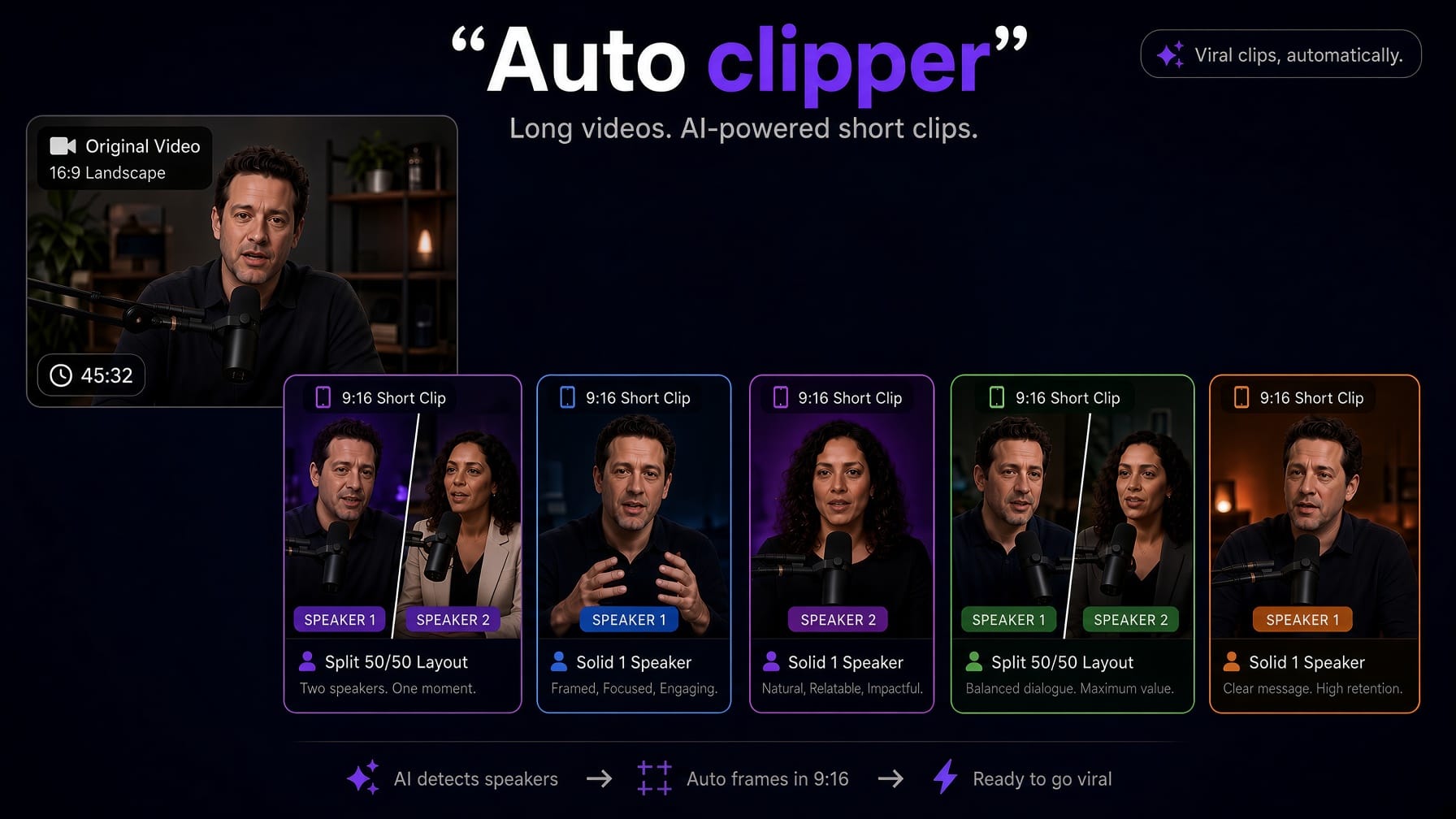
Auto Clipper finds the moments worth posting in a long podcast or video, trims each into its own 9:16 short with captions, and opens them in the full editor.
How it works
Long video in. Shorts you can actually finish.
01
Upload one long video
On the upload screen, switch to Auto Clipper. Drop a single long video — a podcast episode, interview, or lecture — not a multi-clip queue. Choose clip count (1–10, default 5) and length (~50s, from 15–90s). Auto frame is on by default.
02
AI finds the moments
We transcribe the whole video once, then pick self-contained highlights near your target length. Starts and ends snap to real sentences — not random timestamps.
03
Each moment becomes a short
The range is physically trimmed into its own file, with a clip-local transcript and waveform. Auto frame fills 9:16, detects every face on screen, and keeps the speaker centered.
04
Edit any clip in the same editor
The session opens with a clip switcher. Every short is a full captionrich project — captions, cuts, B-roll, zooms — not a window on the long timeline.
05
Save the shorts, not the long file
Clips auto-save as one folder named after the original video. Opening it restores every short. Export one clip, or turn on “Export all clips” on the Export screen.
After the clips land
Not a gallery of MP4s. A session of editors.
Other clip makers dump ranked downloads. Auto Clipper opens each short in captionrich — the same text-based editor you already use for captions, bad takes, B-roll, and export. Switch clips without leaving the page. On /projects, the run is one folder with the original video name, not five lookalike cards.
- Word-level captions already on every short
- Switcher above the preview to jump clips
- Folder on your projects list, named after the source file
podcast-interview.mp4
Original duration · one folder, every clip inside
Multi-speaker layouts
Podcasts have more than one face.
Auto Clipper detects every face in the shot and works out who shares the frame, second by second. Pick a layout and it applies only across those moments — the rest of the clip stays on the single framed speaker. When more people are in shot than the layout has tiles, you choose exactly whose faces to show. Nothing to keyframe.
Split
Two speakers stacked 50/50 — and only across the seconds they're actually both on camera.
3-up
Three in shot: two across the top, the speaker holding the floor full-width below.
Grid
Four at once in a 2×2 — the busiest shot in the room, still readable at phone size.
Speaker focus
One frame that cuts to whoever is actually talking — detected from their lip movement, not the audio.
Face detection picks the cast
Speakers are tracked by position across the clip, so one person shot from two cameras never takes two tiles — and a guest who only appears for a few seconds still gets framed properly.
You choose whose faces make the cut
Six people round a table but only two tiles? captionrich shows you a snapshot of each detected face, taken from your own video, and you pick who to show. The layout then locks to exactly those speakers — nobody else is ever tiled in.
Lip detection picks the talker
Speaker focus reads inner-lip movement frame by frame to find who is actually speaking, then cuts to them. It runs in your browser — the video never leaves your device for this.
Captions land on every short from the one transcript.
Auto frame fills 9:16 and keeps the speaker centered.
Split, 3-up and grid layouts for multi-speaker shots.
Speaker focus follows whoever is talking, read from their lips.
Switcher jumps between clips without reloading.
Projects list shows one folder, original video name.
Export one clip, or all clips sequentially from Export.
The long source is not stored as a cloud project.
Built for podcasts, not multi-hour live streams
Accurate limits — so the page matches the product.
- Pro: sources up to 30 minutes, 10 Auto Clipper runs per month. Max Pro: up to 60 minutes, 30 runs. Yearly plans get 12× the run count. The regular Edit path is still 3 / 4 / 7 minutes.
- Tuned for podcasts, interviews, and long recordingsyou want to clip for TikTok, Reels, and Shorts. It does not score clips for virality, auto-post to social apps, or ingest multi-hour YouTube URLs.
- Free users see an upgrade prompt. Processing and export run in your browser. Highlight detection uses the same AI budget as other captionrich AI features.
FAQ
Questions about Auto Clipper
Open captionrich, choose Auto Clipper, and upload one long podcast or video. Set how many clips you want (1–10, default 5) and a target length (~50 seconds by default). Auto Clipper transcribes the video once, finds self-contained highlights, trims each into its own short, and opens them in the editor so you can polish captions and export.
Auto Clipper is captionrich's long-video-to-shorts tool. It turns one podcast episode or long recording into a session of independent short clips — each a full project with its own transcript, captions, and export — instead of windows on the original file. The long source is processed in your browser and is not saved as a cloud project.
No. Auto Clipper is included on Pro and Max Pro. The Free plan can still edit and caption videos you record as shorts, but long-video clipping requires a paid plan.
Pro accepts 5 Auto Clipper videos a month, each up to 3.5 hours. Max Pro accepts 10, each up to 6 hours. The regular editor path (Edit video) is still 3 / 4 / 7 minutes by plan — Auto Clipper is the long-form path.
You choose 1–10 clips per run. The default is 5 clips at about 50 seconds each (adjustable from 15–90 seconds). If the video isn't long enough for every requested clip, Auto Clipper creates as many as the footage supports and tells you.
Yes, when Auto frame is on (the default). It uses the same face detection as the rest of captionrich, sets the canvas to 9:16, fills the frame, and keeps the speaker centered. If no face is found, the short stays letterboxed 9:16 and the session still succeeds.
Auto Clipper detects every face in the clip and works out who shares the frame at each moment, then offers matching layouts: Split (two speakers stacked 50/50), 3-up (two on top, the main speaker full width below), and Grid (four in a 2×2). A layout applies only across the seconds those speakers are genuinely on screen together — the rest of the clip stays on the single framed speaker. Whenever more people share the frame than the layout has tiles, you choose exactly who to show from face snapshots taken from your own video, and the layout locks to those speakers.
Yes. The Speaker focus layout reads lip movement frame by frame to work out who is actually talking, then keeps the frame on them and cuts across when the floor changes. Detection runs entirely in your browser — the video is never uploaded for it — and the result is saved with the clip, so switching to Speaker focus later is instant.
Yes — that's the point. Each short opens in the full text-based editor: captions, styles, silence and filler cuts, B-roll, zooms, music, and export. A clip switcher lets you jump between shorts in the same session without leaving the editor.
No. Only the trimmed short clips are saved. On your projects page they appear as one folder named after the original file. Opening the folder restores every clip so you can keep switching between them.
Yes. Open Export on any clip in the session and turn on the “Export all clips” toggle (off by default). captionrich then exports each short sequentially as its own MP4. You can also export just the active clip.
Those tools are built to manufacture lots of shorts from hour-long streams, often with virality scores and auto-posting. Auto Clipper is for podcasts and long videos up to 3.5–6 hours, and every result is a real captionrich project you finish by hand — captions, cuts, and all. It does not auto-post to social apps or score clips for virality.
More features
One recording. A week of shorts.
Auto Clipper is on Pro and Max Pro. Open the editor, pick Auto Clipper, and drop a long podcast or video.