What is a text-based video editor? How it works, benefits, and when a timeline is still better
By captionrich team · Published September 3, 2026 · 7 min read
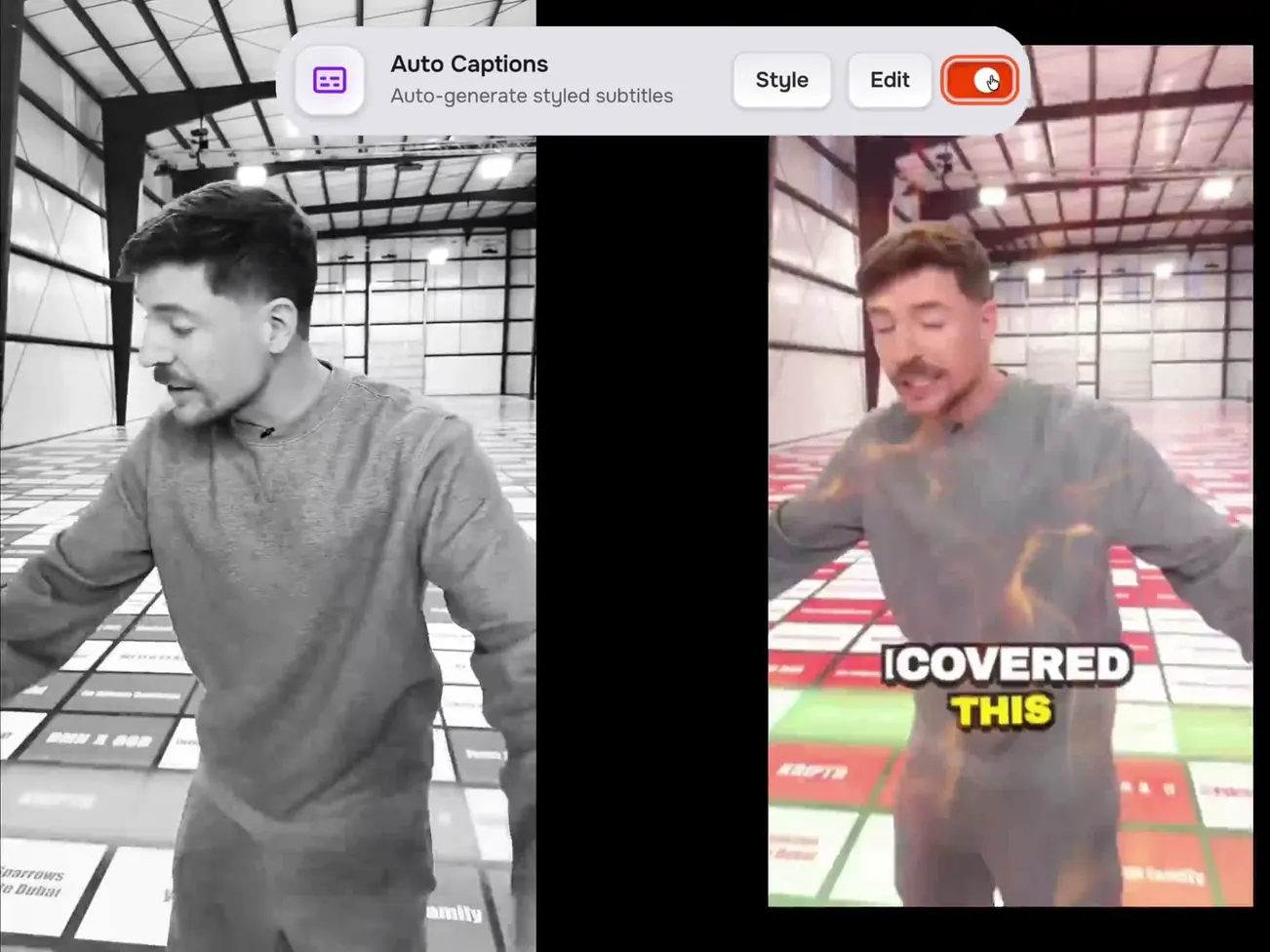
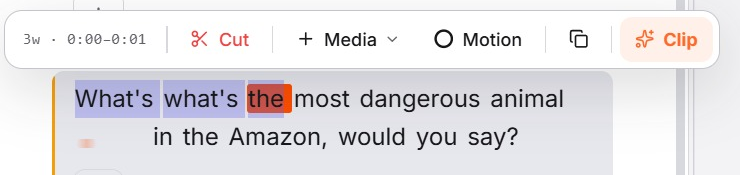
A text-based video editor transcribes your video and lets you edit the footage by editing the words. Delete a sentence in the transcript and that stretch of video is cut; select a word to jump to it, restyle its caption, or drop in B-roll at that exact moment. Because every word carries a timestamp, the editor keeps text and picture in sync without you scrubbing a timeline. It is dramatically faster for talking-head, podcast, interview, and tutorial video, and a poor fit for footage with little speech, such as montages or music videos.
The short version
Traditional video editors show you a timeline: horizontal bars of audio and video that you scrub, trim, and drag. A text-based video editor shows you a transcript instead. Every word in that transcript is linked to the exact moment it was spoken, so editing the text edits the video. Delete "um, let me start again" and the video no longer contains it. Highlight a sentence and press a key to add B-roll over it. Click a word and the playhead jumps there.
Descript popularised the idea for podcasters around 2019. Since then the underlying speech models have become far more accurate and much cheaper to run, and browser-based editors like captionrich apply the same idea to short-form video, where the transcript doubles as the animated captions.
How a text-based editor actually works
- Transcription with word timestamps. The audio is sent to a speech-to-text model that returns not just the words but a start and end time for each one. Modern models reach up to 99% accuracy on clear speech and detect the language automatically.
- The transcript becomes the timeline. Each word is a clickable object mapped to a slice of the source video. The editor keeps a list of which slices are kept and in what order.
- Edits are data, not destruction. Deleting words marks those slices as removed. The original file is untouched, so any cut can be undone or restored. Reordering paragraphs reorders the footage.
- Everything anchors to the words. Captions, emojis, B-roll, sound effects, zooms, and transitions are attached to words or gaps, so they stay in the right place when you cut around them.
- Render at the end. When you export, the editor plays only the kept slices, draws the captions and layers on top, and writes a new video file. In captionrich this happens in your browser; there is no upload to a render farm.
Seven benefits, ranked by how much time they save
1. Finding moments is instant
The single slowest part of timeline editing is locating things: the good take, the sentence you want to clip, the place you said the brand name wrong. In a transcript you press Ctrl+F. This alone turns a 40-minute scrub through an interview into a 40-second search.
2. Cleanup becomes a toggle
Pauses, filler words, and false starts are visible as text, so removing them is a selection or a one-click tool. Remove Silences trims the gaps, Filler Words strips the ums and likes, and Remove Bad Takes spots the sentence you restarted three times and keeps the last attempt. On a five-minute talking-head video that is often 30 to 60 seconds of dead air gone in a minute of work.
3. Captions are already done
Because the editor started from a transcript with word timing, captions are a by-product. Pick a style, and every word appears on screen exactly when it is spoken. Fix a misheard word once and both the caption and the search index update. On a timeline editor, captions are a separate pass that takes as long as the edit itself.
4. Cuts stay honest
Cuts fall between words rather than mid-syllable, because the editor knows where words start and end. Combined with Smart Jump Cuts that tighten the gaps between sentences, the result sounds natural without frame-by-frame nudging.
5. Layers land where you mean them to
Dropping B-roll "on the sentence where I talk about pricing" is a selection in a transcript and a guessing game on a timeline. The same goes for zooms, sound effects, and motion graphics. Since they anchor to words, they move with the footage when you cut earlier parts of the video.
6. Anyone on the team can edit
If you can edit a document you can make a first cut. That means the person who recorded the video, or the marketer who wants the clip, does not have to wait for an editor for the simple changes.
7. It works on a phone
Timelines are cramped on a phone. Text is not. A browser-based text editor lets you fix a caption or cut a flub from wherever you are, which matters for creators who post daily.
Where a timeline is still better
Honest answer: a text-based editor is only as useful as the amount of speech in your footage. It is the wrong tool when:
- There is little or no speech. Montages, music videos, product B-roll reels, and gameplay have nothing to transcribe.
- You need frame-level precision. VFX, match cuts, beat-synced edits, and colour work live on a timeline.
- The edit is structurally complex. Multi-camera switching, picture-in-picture layouts, or long documentaries with hundreds of clips are still faster in a full NLE.
- The audio is chaotic. Heavy crosstalk, loud music under speech, or very poor microphones drop transcription accuracy and with it the value of the transcript.
Text-based vs timeline editing
| Task | Timeline editor | Text-based editor |
|---|---|---|
| Find a specific sentence | Scrub and listen | Search the text |
| Remove pauses and filler words | Manual, cut by cut | One toggle |
| Add captions | Separate pass, often longest | Already there; pick a style |
| Place B-roll on a topic | Estimate the timecode | Select the words |
| Frame-accurate VFX | Yes | No |
| Footage without speech | Yes | Little value |
| Learning curve | Days to weeks | Minutes |
What to look for when choosing one
- Word-level timing, not sentence-level. Without it captions drift and cuts land mid-word.
- Non-destructive cuts. You should be able to restore anything you deleted.
- A real timeline for fine-tuning. Even if you rarely open it.
- Language coverage that matches your audience. Check transcription and translation separately; they often differ.
- Caption styling depth. For short-form, animated word-by-word styles and per-word emphasis matter more than a large font list.
- Where processing happens. Cloud editors upload your footage and queue renders; browser editors keep the work on your machine, which is faster for short clips and better for privacy.
- Export limits on the plan you can afford. Look at videos per month, maximum length per video, and whether the free plan watermarks.
A 90-second example
Take a three-minute talking-head clip recorded on a phone. Upload it to captionrich. The transcript appears; a couple of words need fixing. Turn on Remove Silences and Filler Words: 25 seconds disappear. Select the sentence where you introduce the product and add a B-roll clip from the stock library. Pick the Simple caption style, drag the captions into the safe zone, and export a 9:16 MP4. Total time, including proofreading: about the length of the video itself. The same job on a timeline, with captions, is closer to an hour.
Frequently asked questions
- What is a text-based video editor?
- An editor that transcribes your video and lets you edit the footage by editing the transcript. Deleting words cuts those moments from the video; captions, B-roll, and effects attach to the words.
- Is text-based editing destructive?
- No. Edits are stored as a list of kept and removed slices over the original file. Any deleted word can be restored, and the source video is never modified.
- How accurate does the transcript need to be?
- Cuts and captions are only as good as the words and their timing. Modern models reach up to 99% on clean speech, and you fix the rest by clicking a word. Very noisy audio reduces both accuracy and usefulness.
- Can I still use a timeline in a text-based editor?
- Good ones include a compact timeline for frame-level adjustments. In captionrich it sits under the preview and stays in sync with the transcript.
- Who is text-based video editing best for?
- Creators, podcasters, educators, coaches, and marketers who make talking videos: interviews, tutorials, vlogs, and short-form clips where speech carries the content.
- Which text-based video editors exist?
- Descript is the best-known for podcasts and long-form. captionrich applies the idea to short-form video with animated captions and in-browser export. Several caption tools now offer transcript-based trimming as well.