AI auto edit for talking head videos, in one click.
Pick a template, upload a talking head video, and AI adds the captions, hook title, B-roll, motion graphics, zooms and music in one pass. It opens in the full editor, where every part stays yours to change.
- 8 edit templates
- 14 steps in one run
- One undo step
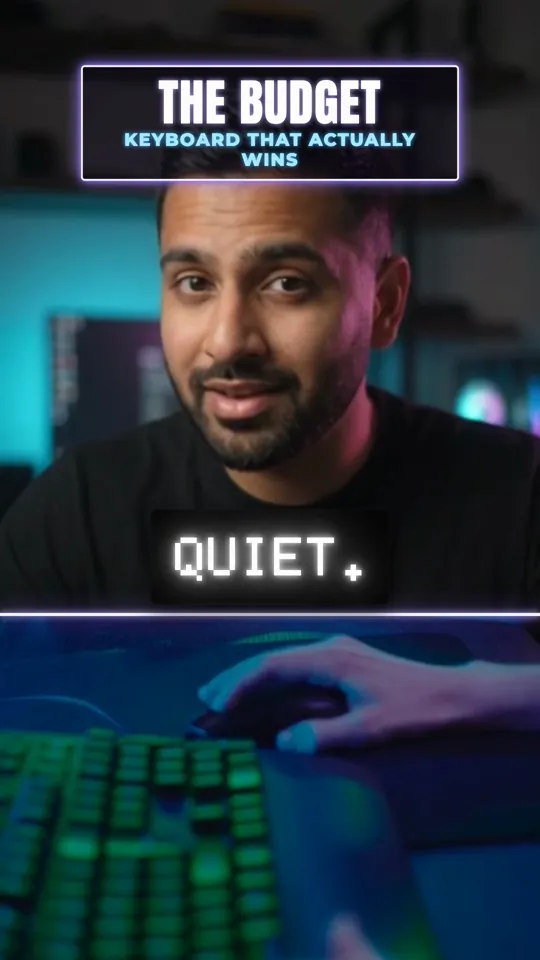 Afterglow
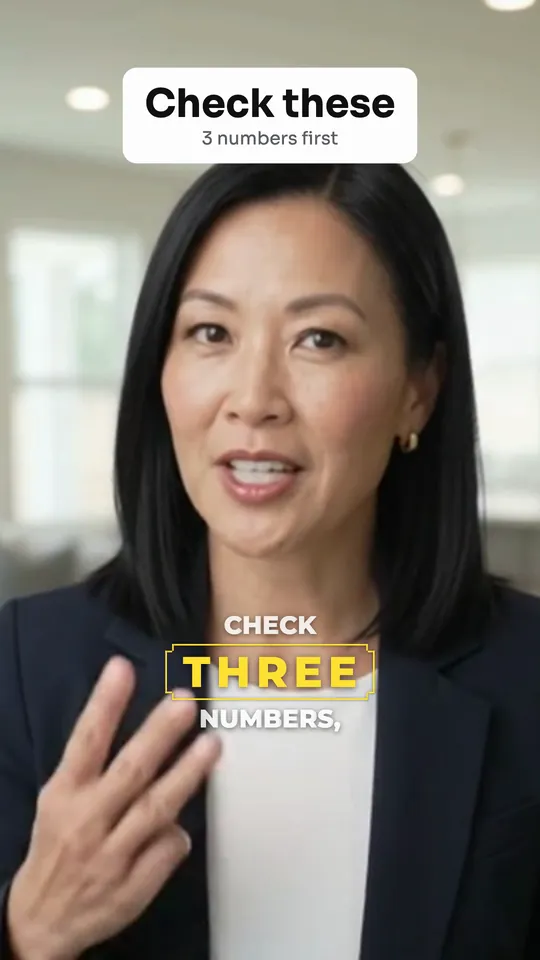 Boardroom
What one run does
Every pass an editor would make, in one run.
AI Auto Edits reads your transcript, then works through the edit in order: the template's caption style first, then the hook title (on screen for the first 3 seconds), emphasis, B-roll, graphics, effects and music. You choose which steps run, and the choice is saved for your next video.
Caption Style, always: every run starts by applying the template's caption style, so the rest of the edit is built around it.
Captions
Hook TitleOn
Open with a title that earns the watch
Auto EmojisOn
Drop relevant emojis on your captions
Expressive CaptionsOn
Emphasize the words that carry the message
Smart Caption PlacementOpt-in
Shift captions off the speaker's face
Visuals
Smart Jump CutsOn
Punch up the pace at every cut
Word CardsOn
Cut to full-screen cards on the key words
Motion GraphicsOn
Animate titles, lists & key moments with AI
Auto B-RollOn
Drop in relevant footage on key moments
EffectsOn
Add zoom & transitions at the right moments
Sound
Bleep ProfanityOpt-in
Censor curse words with a bleep
Background MusicOn
Add a backing track under your video
Cuts
Remove SilencesOpt-in
Cut long pauses and dead air
Remove Bad TakesOpt-in
Cut repeated lines and flubbed takes
Off by default, because cuts change your pacing. Turn them on in settings.
Edit templates
8 looks. Each one a full edit.
A template is more than a caption style. It sets the captions, the hook title's look and tone, the word cards, how B-roll comes in, which zooms and transitions are allowed, the graphics style and the music mood. Every preview below is a real video edited by AI Auto Edits. Hover or tap to play.
Spark
Loud, playful energy for tips, lists and challenges.
Afterglow
Moody neon glow for tech, gaming and late-night stories.
Notebook
Warm, handmade feel for advice, journaling and how-tos.
Mono
Quiet black and white for founders and storytellers.
Boardroom
Clean and credible for business, finance and explainers.
Sunburst
Bright, punchy color for travel, lifestyle and big reveals.
Candid
Laid-back and real for car chats, hot takes and quick thoughts.
Evergreen
Calm, natural tones for wellness, outdoors and slow living.
| Template | Best for | Captions | Hook tone | Music | Emojis |
|---|---|---|---|---|---|
| Spark | Loud, playful energy for tips, lists and challenges. | Doodle | Viral | Hype | Yes |
| Afterglow | Moody neon glow for tech, gaming and late-night stories. | Dot Matrix | Curiosity | Inspiring | Yes |
| Notebook | Warm, handmade feel for advice, journaling and how-tos. | Typewriter | Informative | Classic | No |
| Mono | Quiet black and white for founders and storytellers. | Homelander | Informative | Classic | No |
| Boardroom | Clean and credible for business, finance and explainers. | Prestige | Informative | Motivational | No |
| Sunburst | Bright, punchy color for travel, lifestyle and big reveals. | Color Pop | Bold | Hype | Yes |
| Candid | Laid-back and real for car chats, hot takes and quick thoughts. | Block Drop | Curiosity | Motivational | Yes |
| Evergreen | Calm, natural tones for wellness, outdoors and slow living. | Golden Glow | Informative | Inspiring | No |
Before and after
From a raw take to a video you can post.
The loop opens on the raw recording beside the edited take, then plays the edit from one run: a hook title over the first seconds, word-by-word captions that stress the key words, and B-roll where he talks about the product.
- The hook title is written from what you actually say
- Key words get the template's emphasis look, some as full-screen word cards
- B-roll is matched to the moment and framed by its shape
- Zooms and transitions land on scene changes, not at random
How it works
How to auto edit a video with AI, in four steps
01
Choose AI Auto Edits
Open the editor and pick AI Auto Edits on the start screen. The gear on that page sets which steps every run takes.
02
Pick a template
Hover a template to watch its demo, then press Use. Not sure? Spark suits tips and lists, Boardroom suits business explainers.
03
Upload your video
Drop in a talking head recording, or send it from your phone with a QR code. It is transcribed with word-level timing first.
04
Land in the editor, fully edited
One progress screen ticks off each step, then the editor opens with the whole edit applied. Undo removes all of it in one step.
You stay in control
An AI first draft, not a locked render.
The result opens in captionrich's text-based editor, the same place you cut by deleting words, so finishing the edit is quick.
One undo takes it all back
The whole run is a single undo step, so you can try a template and return to your original video in one move.
Your steps, saved
Turn off music, B-roll or emojis once and every later run skips them. Cuts and bleeps stay off until you turn them on.
Every part stays editable
The hook title, captions, word cards, B-roll and music are normal layers. Restyle, move, retime or delete any of them.
Plans and limits
Who can use AI Auto Edits
- Pro edits videos up to 4 minutes and Max Pro up to 7 minutes. Each run uses your plan's AI credits. On the Free plan the templates show an upgrade prompt, and you can still caption and edit by hand.
- Built for short talking head videos: tips, explainers, reviews and updates for TikTok, Reels and Shorts. For a long podcast, cut it into shorts with Auto Clipper first.
- It does not post to social apps or promise views. B-roll comes from Pexels, Pixabay, Unsplash and GIPHY under each provider's license, and exports render in your browser.
Guide
AI auto editing, explained
What is an AI auto edit?
An AI auto edit is a first edit made for you from your footage and its transcript. Instead of adding captions, a title, B-roll and effects one by one, you pick the look you want and the AI places each of them where your words call for it. In captionrich the look is an edit template, and the result is a normal project you keep editing, not a finished file.
What does one run change, and in what order?
- Captions take the template's caption style. Expressive emphasis stresses the words that carry the message, and the template's emojis land on matching words. See auto captions and auto emojis.
- A hook title is written from what you say and shown over the first seconds.
- Full-screen word cards cut in on a few key words, and motion graphics animate titles, lists and numbers.
- Auto B-roll adds stock footage on the moments it illustrates, framed by Auto Layout from each clip's shape.
- Zooms, transitions and jump cuts add movement at scene changes, and a backing track goes under your voice.
- Optional: remove silences and remove bad takes run first when you turn them on. They are off by default.
How do I choose a template?
- Match the template to the video's tone, not the topic: Spark and Sunburst are loud and bright, Mono and Evergreen are calm, Boardroom is clean and businesslike.
- Watch the demo on the card: each one is a real video edited by that template.
- If the look is close but not right, keep it and change the caption style or hook in the editor. The rest of the edit stays.
What AI Auto Edits does not do
It does not generate an avatar or a voice, post to social apps, or predict views. It edits one short video at a time; to turn a long podcast into shorts, use Auto Clipper first. Filler words are cut with the separate filler word remover.
Related on captionrich
- Talking head video editorThe full workflow for one person talking to camera.
- How to add a text hook to a videoWrite, time and place the first line viewers read.
- TikTok video editorCaptions, cuts and B-roll sized for TikTok.
- Instagram Reels makerCaptions and effects for Reels.
- YouTube Shorts makerCaptions, cuts and 9:16 export for Shorts.
- Submagic alternativecaptionrich compared with Submagic.
- Captions alternativecaptionrich compared with the Captions app.
FAQ
Questions about AI Auto Edits
AI Auto Edits is captionrich's one-click AI video editor for talking head videos. You pick an edit template, upload a video, and one run adds the template's animated captions, a hook title, emphasised key words, emojis, full-screen word cards, stock B-roll, motion graphics, zooms, transitions and background music. The result opens in the full editor, where you can change any part of it.
Open the captionrich editor and choose AI Auto Edits on the start screen. Pick one of the edit templates (hover a template to watch its demo), then upload your talking head video. captionrich transcribes it, runs each step of the edit while a progress screen ticks them off, and opens the finished edit in the editor, ready to tweak and export.
Yes. AI Auto Edits edits a talking head video for you from its transcript: it writes a hook title from what you say, stresses the words that carry the message, finds B-roll and graphics for the moments that need them, and adds captions, zooms, transitions and music in a matching style. You review the result and change whatever you want before exporting.
Yes, all of it. The hook title, captions, word cards, B-roll, graphics, effects and music are normal layers in the editor, so you can restyle, move, retime or delete any of them. The whole run is a single undo step, so one undo returns your original video.
Only if you ask. Removing silences, removing bad takes and bleeping profanity are steps you can turn on with the gear on the AI Auto Edits page; they are off by default because cuts change your pacing. Your choices are saved for later runs. Filler words are a separate tool: run Remove Filler Words in the editor to cut ums and ahs.
No. AI Auto Edits is part of Pro and Max Pro and uses your plan's AI credits. Pro edits videos up to 4 minutes and Max Pro up to 7 minutes. On the Free plan you can still caption and edit videos yourself in the same editor.
Short talking head videos for TikTok, Instagram Reels and YouTube Shorts: tips, explainers, product reviews, founder updates and stories told to camera. For a long podcast or interview, use Auto Clipper first to cut it into shorts, then edit each one.
No. AI Auto Edits edits the video you recorded: your face, your voice and your words stay as they are. The AI decides how to present them with captions, titles, B-roll, graphics, effects and music.
Each template sets the whole look of the edit, not only the captions, and the result is a working project rather than a finished render: it opens in a text-based editor where you can cut by deleting words and change every layer the AI added. Cuts are opt-in, your step choices are saved, and the run undoes in one step.
The features inside every run
Record it. Pick a look. Post it.
AI Auto Edits is on Pro and Max Pro. Open the editor, choose a template and upload your video.