How to add a text hook to a video: formulas, timing and placement
By captionrich team · Published November 26, 2026 · 9 min read
To add a text hook to a video, write one short line, about 3 to 8 words, that tells the viewer what they get or why to stay, and put it on screen from the first frame. On a vertical video, place it in the upper part of the frame: below the app's top bar and above the speaker's face, in large text on a solid box or thick outline. Keep it up for the first few seconds, or for the whole video if it doubles as the title.
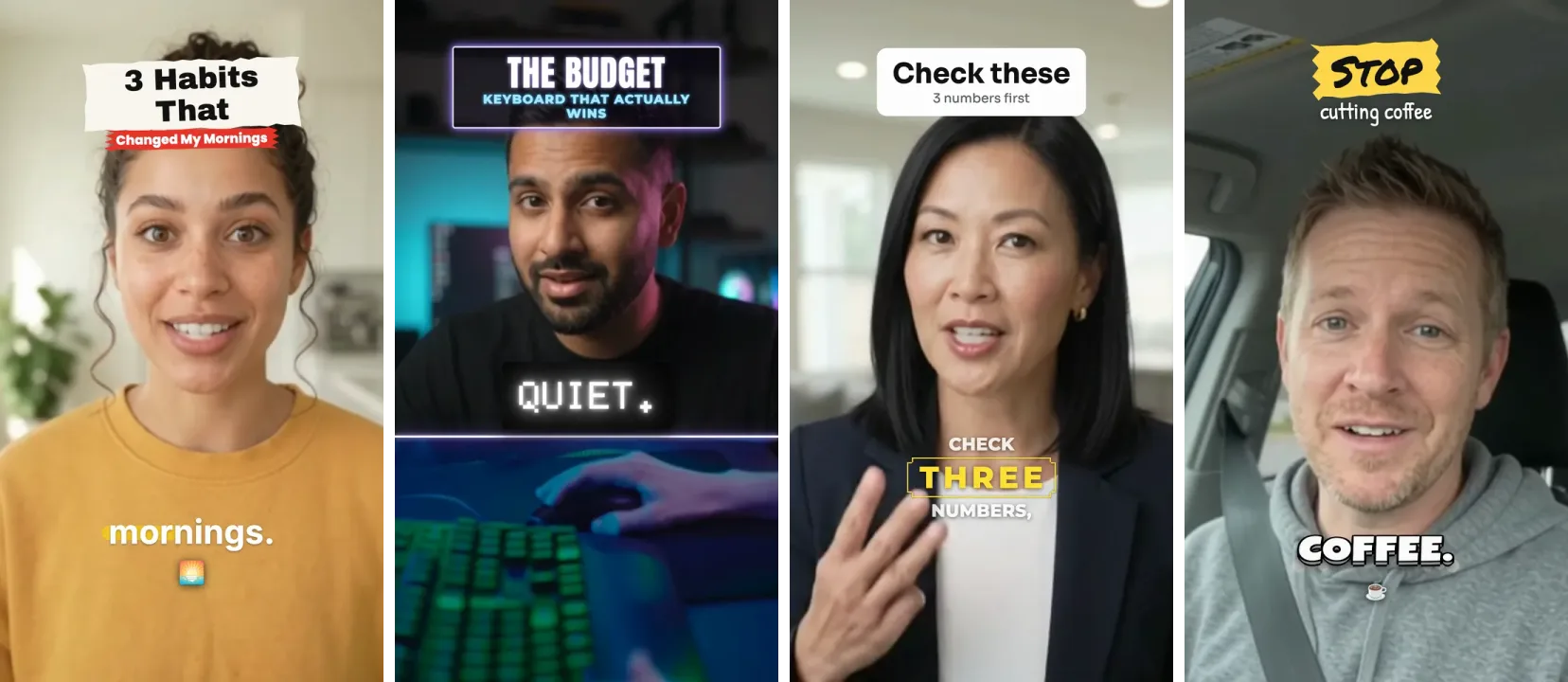
Most people meet a Reel or a TikTok with the sound off and their thumb already moving. Your opening sentence only works if they hear it. A text hook is the on-screen line that does the same job silently: it says, in a few words, what the video is about and why it is worth the next 30 seconds.
It is not the caption under the video, and it is not the subtitles. Subtitles follow the speech word by word; the hook is one fixed line that frames the whole video, usually near the top of the frame. The steps: write it, time it, place it, style it, add it. Each has its own section below, followed by a checklist.
How to write a text hook: 10 formulas
A good hook makes a specific promise the video keeps. These formulas are starting points; the examples are ours, written for different kinds of creators.
| Formula | Example | Best for |
|---|---|---|
| Number + result | 3 habits that fixed my mornings | Lists, routines, tips |
| Stop doing this | Stop rinsing your rice like this | How-tos, common mistakes |
| A question they already ask | Why your Reels stall at 200 views | Education, marketing advice |
| Myth vs truth | Myth: you need a fancy camera | Correcting a popular belief |
| The result first | How I paid off $12k on a teacher's salary | Personal finance, case studies |
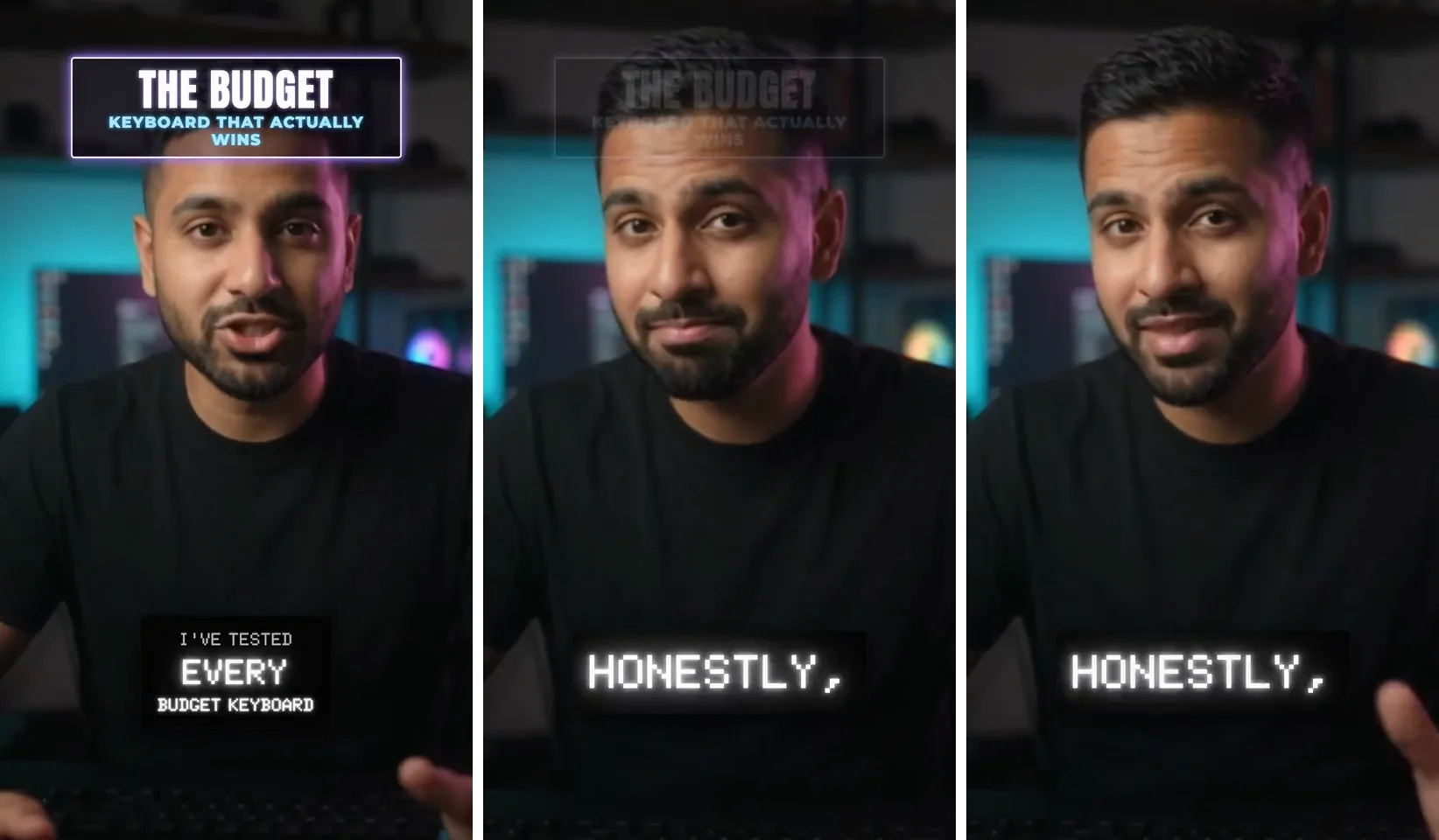
| Curiosity gap | I tested every budget keyboard. One won. | Reviews, experiments |
| Call out the viewer | If you run a small bakery, watch this | Local and niche businesses |
| Hot take | Hot take: cold emails still work | Opinion, B2B, industry commentary |
| Say this instead | Say this instead of "sorry for the late reply" | Communication, careers, language |
| Story opener | I quit with no plan. Here's month six. | Personal stories, founder updates |
Three rules matter more than the formula:
- Be specific. "3 habits that fixed my mornings" beats "Morning tips". Numbers, names and concrete outcomes give the viewer something to picture.
- Match the first spoken line. The hook and the opening sentence should make the same promise, or the hook should set the sentence up. If they say different things, the viewer reads one and hears the other.
- Keep the promise. A hook the video does not pay off gets the swipe a few seconds later. If the honest version is less exciting, make the content better, not the hook louder.
When should the hook appear, and for how long?
From the first frame. A hook that fades in after a second has already missed the people who decide in that second. How long it stays depends on what else it does:
- Only as an opener: about 3 seconds, long enough to read a short line twice. captionrich's AI Auto Edits times its hook title to the first 3 seconds and fades it out.
- As the title of the video: the whole video. Viewers who join late, or rewatch, still see what it is about. This works best when the hook is small enough not to compete with the captions.
- Never shorter than the reading time. If you cannot read the line aloud twice before it disappears, it is too long or too brief.
Where to put a text hook so app buttons don't cover it
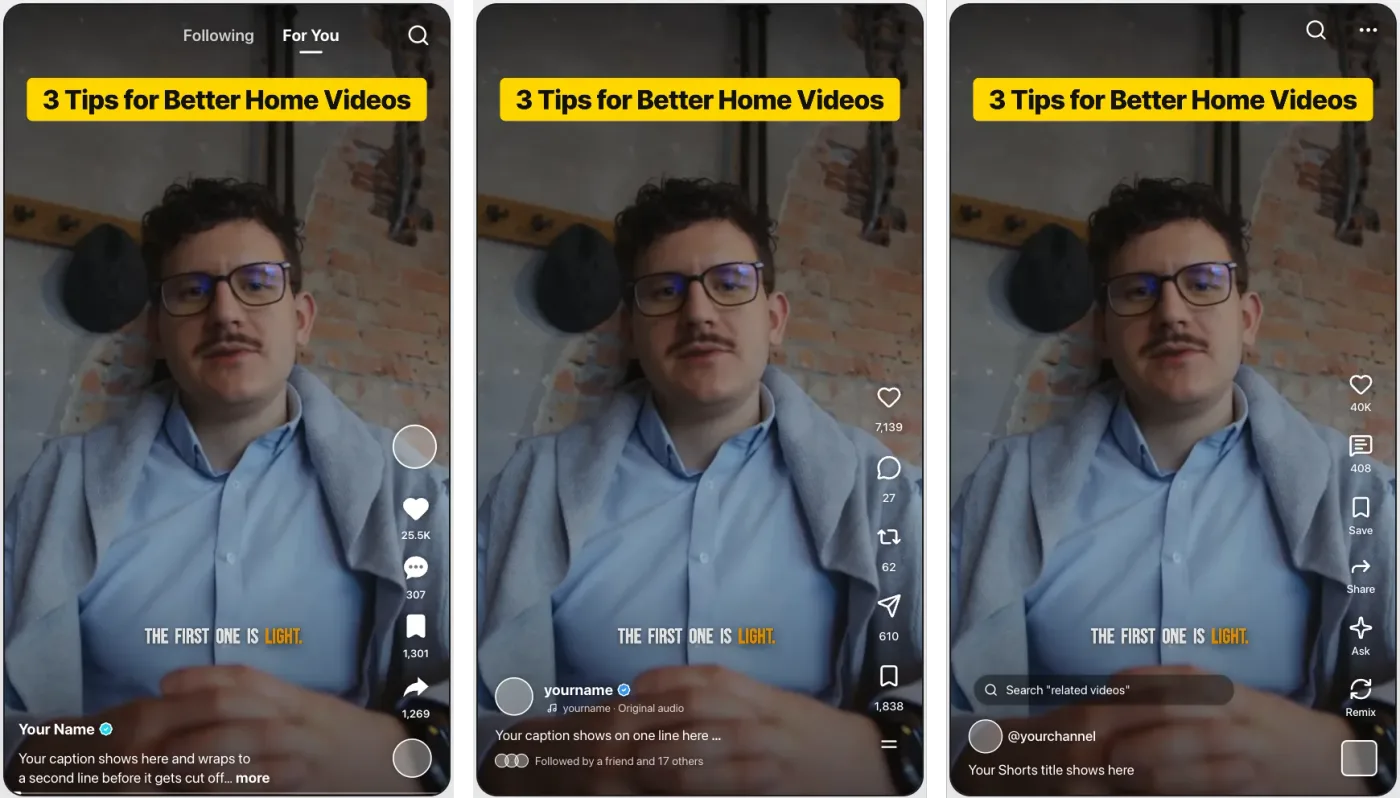
TikTok, Instagram Reels and YouTube Shorts all draw their own interface over your video: tabs at the top, a column of buttons on the right, and the account name and description at the bottom. A hook placed under any of them is partly hidden. We measured where each app's interface sits on a 1080 x 1920 video, from Android screenshots of each app's main feed in November 2026:
| App | Top of the frame | Right side | Bottom |
|---|---|---|---|
| TikTok | Following / For You tabs and search: top 118 px (6%) | Button column: right 136 px, from 1,022 px down (53%) | Name and description: from 1,741 px down (bottom 9%) |
| Instagram Reels | Nothing over the video in our capture | Button column: right 112 px, from 922 px down (48%) | Name, audio and description: from 1,636 px down (bottom 15%) |
| YouTube Shorts | Search and menu icons: top right, 92 px (5%) | Button column: right 130 px, from 892 px down (46%) | Search pill, channel and title: from 1,628 px down (bottom 15%) |
The useful result: from about 7% to 46% of the height, the full width of the frame is clear on all three apps. In a typical talking head shot the face sits in the lower half of that band, so the hook goes in its top part, roughly 8% to 25% down. Interfaces change between app versions and between iPhone and Android, and ads add extra rows, so treat these as a guide and check the app's preview before posting.
Size, font and contrast
- Large. On a phone the hook should be readable without effort. If it needs more than two lines at a large size, the line is too long.
- On a solid shape or a thick outline. Video changes behind the text, so white text that reads well on one frame disappears on the next. A box, pill or card behind the words fixes that for every frame. WCAG's contrast minimum asks for at least 4.5:1 for normal text and 3:1 for large text, a useful bar for the box and the type on it.
- One idea per line. On a two-line hook, put the hook in the first line and the detail in the second, smaller one: "Check these" over "3 numbers first".
- A font that matches the video. A heavy sans for energy, a serif for calm stories, a hand-drawn face for crafts. Stay with one or two fonts across a series so the hook becomes recognisable.
How to add a text hook in Instagram and TikTok
Instagram: the Reels editor has a text tool, covered in Instagram's help article Add text and text-to-speech to your reel. Type the hook, pick a style and colour, and drag it into the top band. In Meta's Edits app, text appears as its own clip on the timeline; per Edits' editing help, press and hold either end of a clip to change how long it shows, which is how you keep a hook to the first few seconds.
TikTok: add text from the editing screen, place it, then drag the arrows on either side of the text to set when it starts and how long it stays (TikTok: editing videos and photos). TikTok can also read text aloud with text-to-speech.
In-app text is quick, but it lives only in that app. If you post the same video to TikTok, Reels and Shorts, add the hook in your editor before exporting so it travels with the file, and choose a position that clears all three interfaces.
How to add a hook title in captionrich
captionrich calls the text hook a Hook Title. It is a text layer that starts on the first frame and stays on top of the video.
- Open Hook Title. On desktop, click AI Hook Title in the row above the preview; on a phone, tap Hook Title in the toolbar.
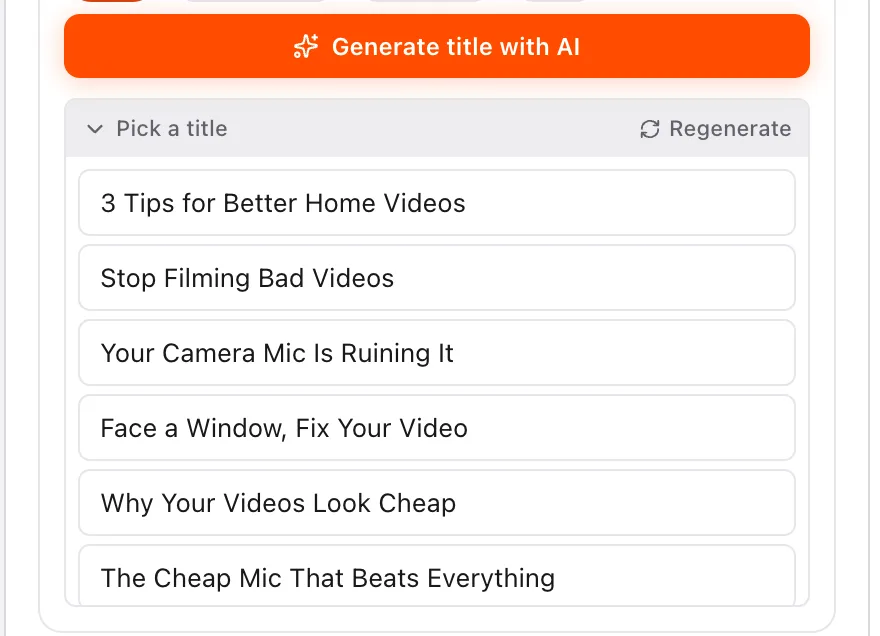
- Write the line, or generate one. Type your own, or pick a tone (Viral, Informative, Curiosity or Bold) and press Generate title with AI. The AI suggestions are written from your transcript and use AI credits, which come with the paid plans.
- Choose a look. Open the layer's Template row to pick a style from the Text tab's 64 templates, 14 of them made for hooks, such as Stop Scroll, Big Number, Hot Take, Myth and Scrapbook. On a two-line look, your phrase is spread over its lines.
- Set the timing. Leave Show for the whole video on, or turn it off and set Show for the first N seconds. A hook that leaves early fades out.
- Check the position. The hook starts near the top of the frame. Turn on the TikTok, Reels or Shorts safe-zone overlay to see the app's interface over your preview.
AI Auto Edits adds a hook title as one step of a full edit: each edit template has its own hook look and tone, and the run shows the hook for the first 3 seconds. The examples at the top of this page are from those templates. To style the rest of the on-screen text, see the caption styles and, for animated titles and stats later in the video, motion graphics.
The text hook checklist
- On screen from the first frame, not faded in after a second.
- 3 to 8 words, two lines at most, readable in one glance.
- In the clear band: below the top bar, above the face, away from the right-hand buttons.
- On a solid box, pill or thick outline, so it reads over every frame.
- Says the same thing as your first sentence, and the video delivers it.
- Stays long enough to read twice: about 3 seconds as an opener, the whole video as a title.
The hook is the first edit a viewer sees, not the only one. For the cut, zooms and captions that follow it, read how to edit talking head videos, and see how the same hook behaves across apps on the Instagram Reels and TikTok pages.
Frequently asked questions
- What is a text hook in a video?
- A short line of on-screen text in the first second that says what the video is about and why to keep watching. It works for viewers who watch with the sound off.
- How long should a text hook be?
- About 3 to 8 words, on one or two lines. If it needs a third line at a readable size, cut words.
- How long should the hook stay on screen?
- About 3 seconds if it only opens the video. If it works as the title, leave it on for the whole video, smaller than the captions.
- Where should I put text on a Reel or TikTok?
- In the upper part of the frame, below the app's top bar and above the speaker's face. In our measurements, the band from about 7% to 46% of the height was clear of all three apps' interfaces.
- Should the text hook match what I say?
- Yes. The hook and your first sentence should make the same promise. A mismatch makes the viewer choose between reading and listening.
- Can AI write a hook for my video?
- Yes. captionrich's AI Hook Title suggests hooks from your transcript in four tones, using AI credits on the paid plans. Treat them as drafts: check that the video delivers what the hook promises.