How to turn a podcast into short clips for TikTok, Reels and Shorts
By captionrich team · Published November 26, 2026 · 12 min read
To turn a podcast into short clips, get a transcript of the episode, read it for moments that make sense on their own, and cut each to about 20 to 60 seconds, opening on a clear first line and ending on the payoff. Reframe it to vertical 9:16 on whoever is speaking, add captions and a text hook, and export one file per clip. AI clippers such as captionrich Auto Clipper, Opus Clip and Klap automate the finding and cutting; you still review every clip.
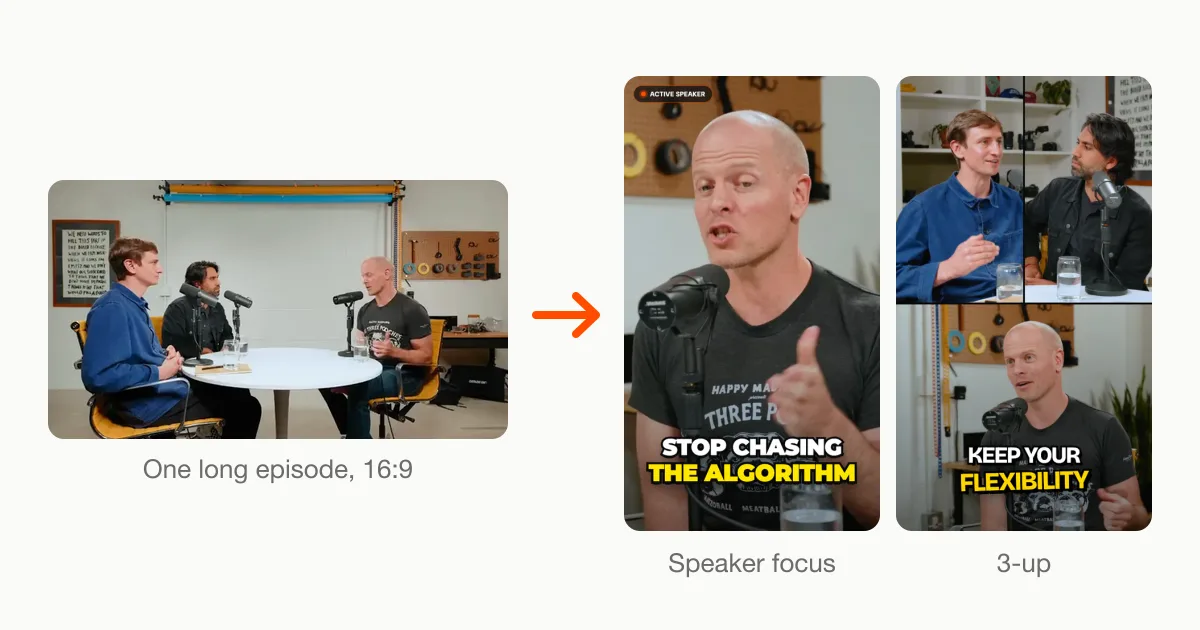
An hour of conversation usually holds a few moments that work alone as a short video: a question with a full answer, a story that ends, an opinion someone will argue with. The job is finding them, cutting them cleanly, and making them watchable on a phone with the sound off. The manual method comes first because it works in any editor; the automatic one follows.
Podcast to short clips in six steps
- Get a transcript with timestamps. From your recording tool, your editor, or a free converter.
- Mark the moments. Read the transcript and highlight passages that make sense to someone who never heard the episode.
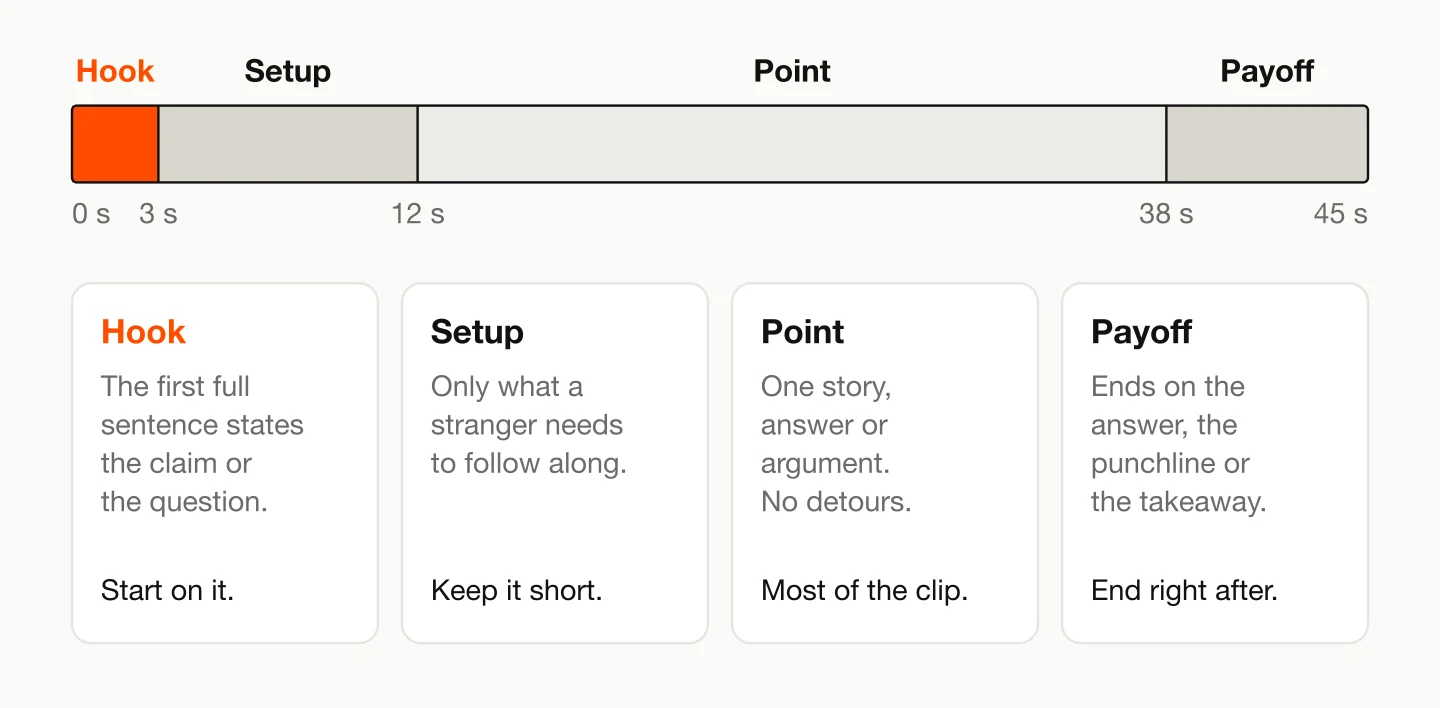
- Cut each one to about 20 to 60 seconds. Start on the first full sentence of the point and end right after the payoff.
- Reframe to 9:16. Crop the wide shot to a vertical frame on whoever is speaking.
- Add captions and a hook. Burn in captions and put a short line of text on the first seconds that says what the clip is about.
- Export and post. One file per clip, checked against each platform's length rules.
Step 1: Get a transcript with timestamps
Reading is faster than listening, and a transcript is searchable: you can jump to a guest's name, a product, or the word "mistake" instead of scrubbing an hour of audio. Most podcast recording tools and many editors produce a transcript. If yours does not, captionrich's free video to text converter runs a Whisper speech model in your browser, so the episode is not uploaded, and downloads the words as plain text or as an SRT or VTT subtitle file with timestamps.
Step 2: How do you find the best moments in a podcast?
Read the transcript with one question in mind: would this make sense to someone scrolling past who has never heard of the show? These are the passages that usually pass that test:
- A question and its complete answer. The host's question works as a built-in hook, and the answer supplies the payoff.
- A short story with an ending. "The first time we raised prices, half our customers..." carries people to the last line.
- A strong or surprising opinion. Disagreeing with common advice gives viewers something to react to.
- A specific number, example, or instruction. "Check these three things before you sign" is concrete enough to save.
- A real reaction. Laughter or pushback between two people reads well when both faces are on screen.
Skip passages that lean on earlier context ("like I said before", "going back to that"), inside jokes, sponsor reads, and the intro and outro. If a stranger would need the previous five minutes to follow, it is not a clip yet. Sometimes it becomes one when you start a sentence or two earlier.
Step 3: How long should a podcast clip be?
For most podcast clips, 20 to 60 seconds is a sensible range: long enough for a setup and a payoff, short enough to hold one idea. Let the content decide the length. A clip that needs 75 seconds to land beats a 45-second clip that stops before the answer, and padding a 20-second moment to reach a target only adds the slow part.
Cut on sentence boundaries. Start on the first word of the opening sentence, not the "so" or "yeah" before it, and end just after the last word of the payoff, before the other person starts replying.
Maximum video length on TikTok, Reels, Shorts and LinkedIn
Every major platform now accepts uploads far longer than a clip, so the limit you will actually hit is a reach or copyright rule, not the upload cap. This is what each platform's own help page says:
| Platform | Maximum length | What matters for clips | Official source |
|---|---|---|---|
| TikTok | 10 minutes recorded in the app, 60 minutes uploaded | Length is rarely the constraint. Upload the finished file. | TikTok Help: Camera tools |
| Instagram Reels | 20 minutes | Instagram says reels over 3 minutes won't be recommended to new audiences. | Instagram Help: Record a reel |
| YouTube Shorts | 3 minutes, square or vertical only | A wider video counts as a regular video. A Short over 1 minute with an active Content ID claim is blocked. | YouTube Help: three-minute Shorts |
| LinkedIn (feed video) | 15 minutes, minimum 3 seconds from desktop | Aspect ratios from 1:2.4 to 2.4:1 are accepted, so a 9:16 clip uploads as it is. | LinkedIn Help: Share videos |
Checked on 26 November 2026. Limits roll out account by account, so trust your own upload screen if it differs. The YouTube rule is the one podcast clips trip over: background music or a played-in clip can carry a Content ID claim, and on a Short longer than a minute that claim blocks the video worldwide until it is resolved.
Step 4: Reframe the clip to 9:16 on the speaker
Most video podcasts are filmed wide, at 16:9, with two or three people in the shot. A vertical 9:16 crop at the same height keeps only about 32 percent of that width, so the crop has to choose a person, and it has to move when the person talking changes.
In a timeline editor, set the sequence to 1080 x 1920, scale the footage until it fills the height, and keyframe its position to follow whoever is talking. Premiere Pro's Auto Reframe Sequence and DaVinci Resolve's Smart Reframe, which is part of the paid Resolve Studio, can track a subject for you. Check every change of speaker either way: a tracker can stay on the wrong face when two people share the frame.
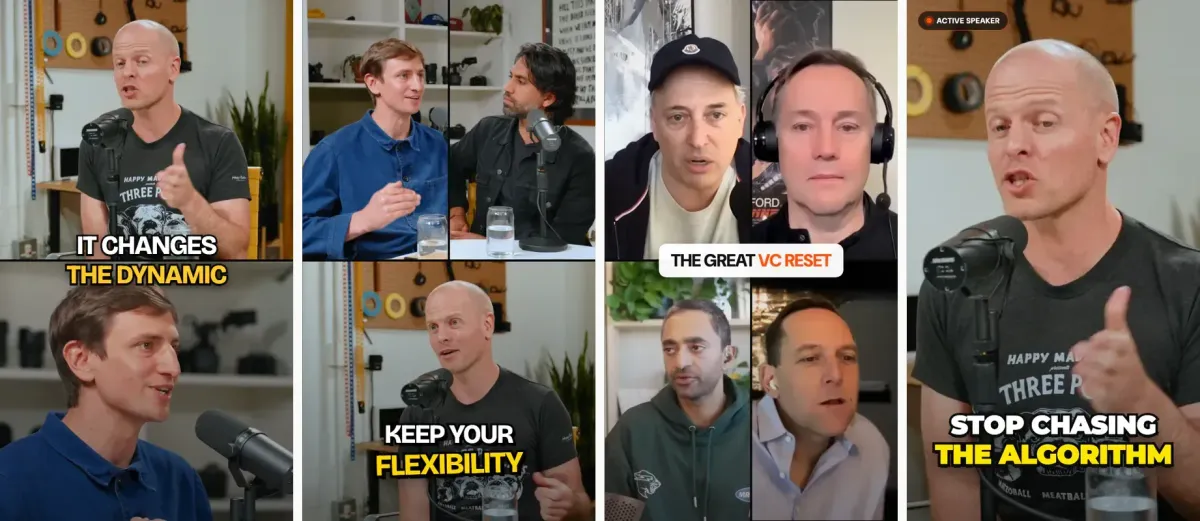
When two people trade short lines, cutting between them every two seconds is tiring to watch. A split layout, one person on the top half and one on the bottom, keeps both on screen and shows the reaction as well as the line.
Step 5: Add captions and a hook
A clip has to make sense to someone scrolling with the sound off, so burn in captions: the text is drawn into the picture and shows on every app. Proofread names and numbers, where speech-to-text slips most, and keep captions clear of the app's buttons. Bold word-by-word caption styles suit fast conversation; a calmer style suits a slow interview.
The first line of a podcast clip often lands mid-conversation, so add a short text hook that says what the clip is about, such as "Why we stopped running ads" over a founder answering a question. Keep it on screen for the first few seconds. The method, with examples, is in how to add a text hook to a video.
What makes a podcast clip work: a checklist
Run each clip through this list before you export. A clip that fails the first four is not worth polishing.
- It makes sense to someone who has never heard the episode.
- It opens on a full sentence that states the claim, asks the question, or starts the story.
- It covers one idea.
- It ends on the payoff (the answer, the punchline, or the takeaway), not on "and so...".
- It has no references to earlier parts of the episode, such as "like I said".
- The frame stays on whoever is talking, and no one is cut in half at the edge.
- Captions are proofread, especially names and numbers, and sit clear of the app's buttons.
- A text hook or title on the first seconds says what the clip is about.
- It fits the platform: under 3 minutes for Shorts, and under 1 minute on Shorts if it contains music you do not own.
- The guest is named on screen or in the post, and you have permission to post the recording.
How to turn a podcast into clips automatically with Auto Clipper
Auto Clipper is captionrich's long-video-to-shorts tool. It is on the Pro plan, which takes 5 long videos a month of up to 3.5 hours each, and the Max Pro plan, which takes 10 a month of up to 6 hours each. It also uses the plan's AI credits to pick the moments. It works from a video file you upload: it does not import YouTube links, and an audio-only episode needs a video version first.
- Choose the settings. Number of clips from 1 to 10 (default 5), a target length from 15 to 90 seconds (default 50), and 9:16 or 16:9. It aims for clips within about 30 percent of the target either way, and runs longer when a story needs it. Auto frame is on by default.
- It reads the whole episode. The video is transcribed once, outlined into chapters, and the strongest self-contained moment in each chapter becomes a candidate. Each one starts and ends on a full sentence, and it is set to skip intros, ads and outros.
- It scores and ranks the candidates. Each gets a 0 to 100 score, the average of ratings for hook strength, emotion, clarity, and how well it stands alone. The best are kept and listed best first. The score ranks clips within your episode; it does not predict views.
- Each moment becomes its own short. Every clip is a separate captionrich project with its own transcript and captions, and a switcher moves between them in the editor. If the video is too short for the number you asked for, you get as many as fit and a note saying so.
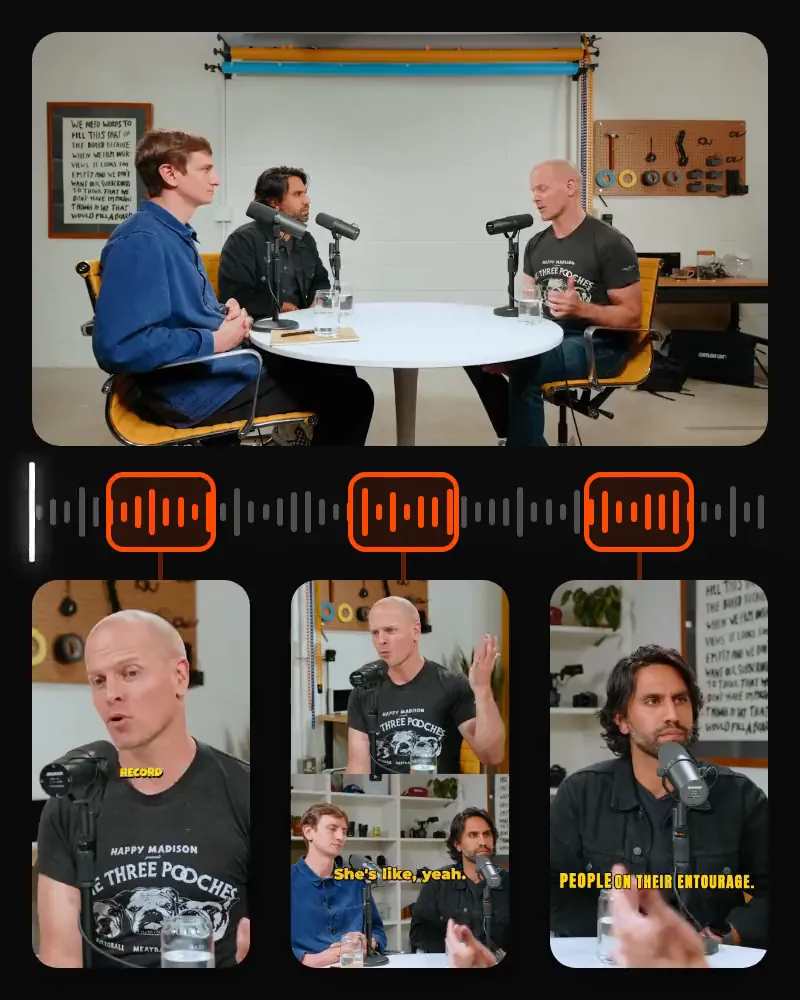
With Auto frame on, each clip fills the vertical frame and keeps the speaker centred. When two or more people share the shot, layouts appear for the seconds they are on screen together: Split for two, 3-up for three, Grid for four. Speaker focus reads lip movement to keep the frame on whoever is talking and cuts across when the floor changes. Face and lip detection run in your browser, and the video is not uploaded for them.
If a clip starts late or stops early, drag its window on the episode timeline, which shows the transcript under it, or place a new clip at the playhead. Then finish each short in the editor: restyle the captions, cut a stray "um", add a hook. Export one clip, or switch on Export all clips to render every short in turn as its own MP4. The long source is not saved as a cloud project; the shorts are, in one folder named after the original file.
Other AI clipping tools, and when they are the better choice
Auto Clipper is built for podcasts and long talks where you want fewer clips, each finished by hand. Dedicated clipping tools go further on volume and publishing:
- Opus Clip adds virality scores, prompt-based search for moments with ClipAnything, YouTube links as input, and posting to social accounts. See captionrich vs Opus Clip.
- Klap imports from YouTube, Twitch and other links, counts clips rather than source length, and schedules posts to five social platforms. See how Klap compares.
- Vizard takes uploads up to 10 hours, makes up to 40 clips from a one-hour video by its own figure, and offers AI clipping on its free plan with a watermark. See the Vizard comparison.
- Riverside records remote guests on separate tracks and clips with Magic Clips, so recording and clipping live in one tool. captionrich does not record podcasts. See Riverside vs captionrich.
These details come from our comparison pages, checked between September and November 2026. Prices and limits change often, so confirm on each tool's site before you pay.
Manual or automatic: which should you use?
| Your situation | Best fit |
|---|---|
| One or two clips a week from a show you host | By hand: you already know where the good moments are |
| Every episode, 5 to 10 clips, each polished | Auto Clipper, then finish each clip in the editor |
| Dozens of clips per episode, posting handled for you | A volume tool such as Opus Clip, Klap or Vizard |
| Remote interviews you still need to record | A recording tool with clipping, such as Riverside |
On the Free plan you can still do the manual method end to end: cut the moment out of the episode with the free video trimmer, then caption and reframe it in the editor, which takes 3 videos a month of up to 3 minutes each. More on how shows use captionrich is on the podcasters page.
Frequently asked questions
- How many clips can you get from a one-hour podcast?
- There is no fixed number: it depends on how many moments stand alone, not on the running time. A focused interview gives more than a loose chat. Auto Clipper makes up to 10 per run, and fewer, better clips beat an episode chopped into even pieces.
- What is the best length for a podcast clip?
- Usually 20 to 60 seconds, enough for a setup and a payoff. Go longer when the story needs it, but keep Shorts and reels to 3 minutes or less: Shorts stop there, and Instagram does not recommend longer reels to new audiences.
- Can I make clips from an audio-only podcast?
- Yes, but short-video apps need video, so turn the audio into a video first, for example with a still image or a waveform. The captionrich editor and Auto Clipper only accept video files.
- Should podcast clips be vertical or horizontal?
- Vertical 9:16 for TikTok, Reels and Shorts. YouTube treats a video wider than square as a regular video, not a Short. LinkedIn accepts both, from 1:2.4 to 2.4:1.
- How do I show two people in one podcast clip?
- Stack them in a split layout, one on the top half and one on the bottom, or cut between them on each change of speaker. A split works best when they trade short lines or react to each other.
- Is Auto Clipper free?
- No. It is on Pro (5 long videos a month, up to 3.5 hours each) and Max Pro (10 a month, up to 6 hours each). On the Free plan you can trim a clip out yourself and caption it in the editor.
- Can I post clips from someone else's podcast?
- Only with permission. A clip reuses the show's recording, and posting it without permission can get it taken down for copyright. Ask the show first.