Open captions vs closed captions: the difference and when to use each
By captionrich team · Published November 26, 2026 · 10 min read
Open captions are burned into the video, so every viewer sees them and nobody can turn them off. Closed captions are a separate track, usually an SRT or VTT file, that viewers can switch on or off. Use closed captions where the platform accepts a caption file: YouTube, Facebook, LinkedIn, X and Vimeo. Use open captions on TikTok and Instagram, which do not document a way to upload your own file, and whenever the caption style is part of the video. For the widest reach, use both.
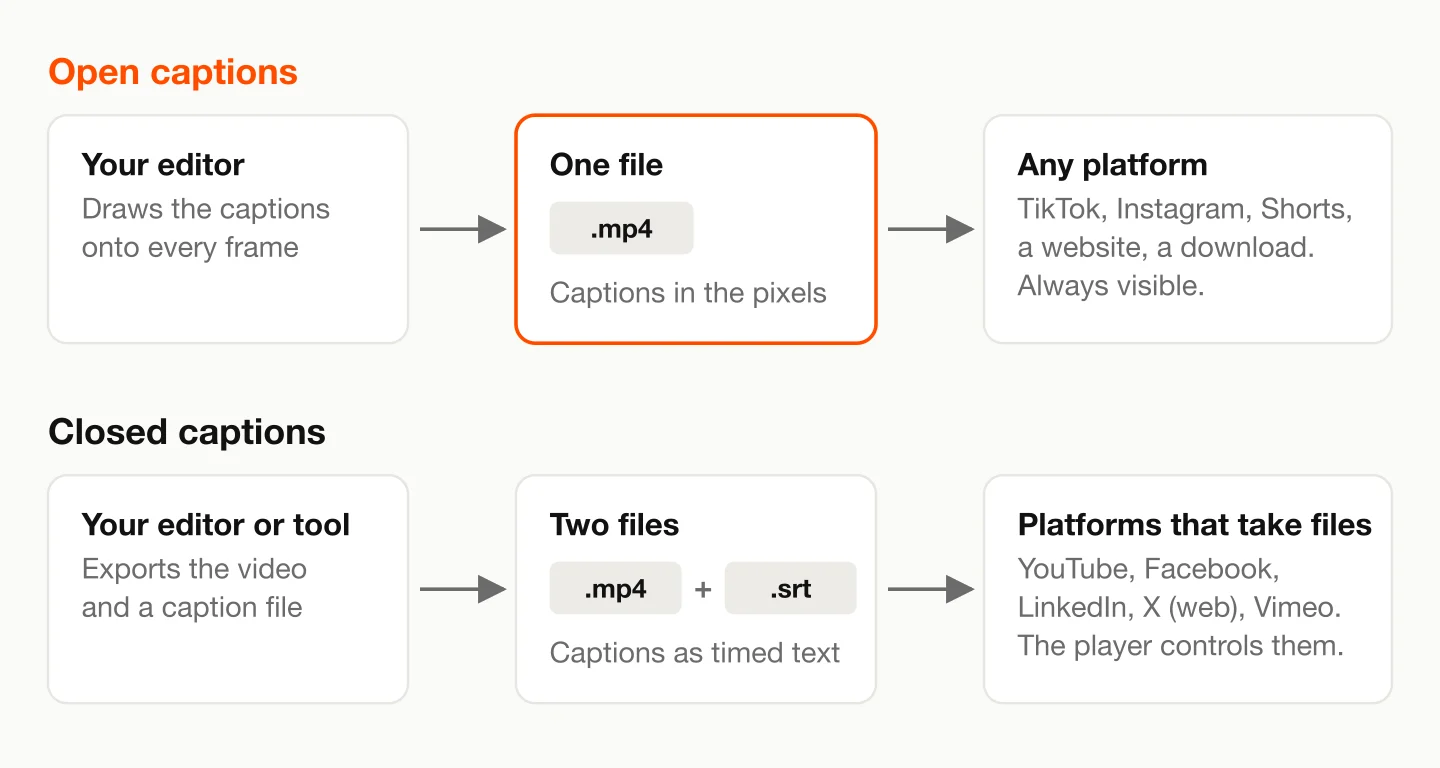
The two terms describe where the caption text lives. With open captions it lives in the pixels of the video, put there by an editor before upload. With closed captions it lives in a separate file or track that travels next to the video, and the player draws it on top when asked. Everything else, from who can turn them off to which platforms support them, follows from that.
The short answer: which should you use?
- Posting to TikTok or Instagram: open captions. Neither documents a way to upload your own caption file for regular posts, and their automatic captions are only as accurate as the speech recognition.
- Posting to YouTube, LinkedIn, Facebook, X or Vimeo: closed captions at minimum, because the platform will show them and viewers can resize or hide them. Add open captions too if the video is short-form and meant to be watched in a muted feed.
- Posting one video to several platforms: open captions in the file, plus the caption file wherever it is accepted.
- Need several languages: closed captions, one file per language. Open captions mean one exported video per language.
- Course, company or public sector video: make sure the captions include sounds and speaker names, since that is what accessibility guidelines ask for. Closed captions add viewer control; open captions also qualify.
What are open captions?
Open captions, also called burned-in or hardcoded captions, are rendered into every frame of the video, the same way a title or a logo is. The W3C's accessibility glossary defines them simply as "any captions that cannot be turned off". The animated, word-by-word captions on short-form video are open captions, because caption files offer little or no styling: YouTube, for example, ignores any styling in an SRT file.
Pros
- Always visible. No viewer has to know where the CC button is, and muted autoplay shows them from the first frame.
- Works everywhere. One MP4 plays the same on TikTok, Instagram, YouTube Shorts, a website or a downloaded copy.
- Full control of the look. Font, size, colour, animation, emphasis and position are yours.
- Survives reposts. Downloads, re-uploads and screen recordings keep the captions.
Cons
- Cannot be turned off or resized. A viewer with low vision cannot make them bigger, and anyone who finds them distracting is stuck with them.
- Fixed once exported. A typo means editing and uploading the video again.
- One language per file. A second language needs a second export.
- Pixels, not text. A caption file hands the platform the words themselves. Burned-in captions are part of the image, so add the key terms to your description or caption text as well.
- They can cover the picture. Place them clear of faces, on-screen text and the app's buttons.
What are closed captions?
Closed captions are a timed text track, usually an SRT (SubRip) or WebVTT (.vtt) file, uploaded next to the video or generated by the platform. The player draws them on top of the picture in its own style, and viewers turn them on or off. The W3C describes them as captions "that can be turned on and off with some players".
Pros
- Viewer control. On/off, and on many players the size, font and colour, which matters for people with low vision.
- Editable after publishing. Fix a word in the file or in the platform's editor without re-uploading the video.
- Several languages. Upload one file per language and let viewers choose.
- Real text. The platform receives the words, not a picture of them.
Cons
- Not accepted everywhere. TikTok and Instagram do not document caption file uploads for regular posts.
- Plain styling. No animation, brand fonts or highlighted words.
- Often off by default. Unless the viewer or the platform turns them on, they are not seen.
- Lost in reposts. The track usually stays behind when a video is downloaded or shared elsewhere.
Open vs closed captions at a glance
| Feature | Open captions | Closed captions |
|---|---|---|
| Where the text lives | In the video pixels | In a separate track or file |
| Viewer can turn them off | No | Yes |
| Viewer can resize them | No | On many players |
| Style and animation | Anything your editor can draw | The player's style |
| Fix a typo after posting | Re-export and re-upload | Edit the track |
| Languages | One per video file | One file per language |
| Works on TikTok and Instagram | Yes | Only their automatic captions |
| Survives download and repost | Yes | Usually not |
| Typical file | MP4 | SRT or VTT next to the MP4 |
Which platforms accept closed caption files?
This is where the choice is often made for you. We checked each platform's own help pages in November 2026. Menus move often, so the links go to the official page for each fact.
| Platform | Upload your own caption file | Automatic captions | Source |
|---|---|---|---|
| YouTube (incl. Shorts) | Yes, in YouTube Studio. SRT, VTT, SBV, TTML, SCC and others | Yes, 60+ languages, published automatically | Formats, automatic captions |
Yes, from a computer, for profile and Page videos. SRT named like video.en_US.srt | Yes, an option when posting from a computer | Profile videos, Page videos, file naming | |
| Not documented for posts or Reels (SRT is accepted for ads in Meta Ads Manager) | Yes, automatic closed captions for Reels, set in the app | Reels captions, ad captions | |
| TikTok | Not documented | Yes, auto-generated captions; viewers can hide them | Creating, watching |
| Yes, on desktop, for members and Pages. SRT; video ads also take SRT | Yes, 10 languages, desktop and app | SRT upload, auto captions | |
| X | Yes, on the web only. SRT | For some videos; X says not all videos have them | SRT upload, video help |
| Vimeo | Yes. SRT or WebVTT (Vimeo recommends WebVTT), UTF-8 | Yes, on every plan including Free, for videos up to 8 hours | Caption files, automatic captions |
Three details from those pages change how captions behave in practice. Facebook says people who watch a Page's video with the sound off see its captions automatically. X says captions show automatically on iOS and Android when a video plays in the timeline. And Facebook noted in September 2025 that every video posted to Facebook is now shared as a reel; its help pages still document SRT upload from a computer, so check the option is there before you rely on it.
Captions vs subtitles vs SDH
The other common mix-up is about content, not delivery. Open and closed describe where the text lives. Captions, subtitles and SDH describe what the text says and who it is for.
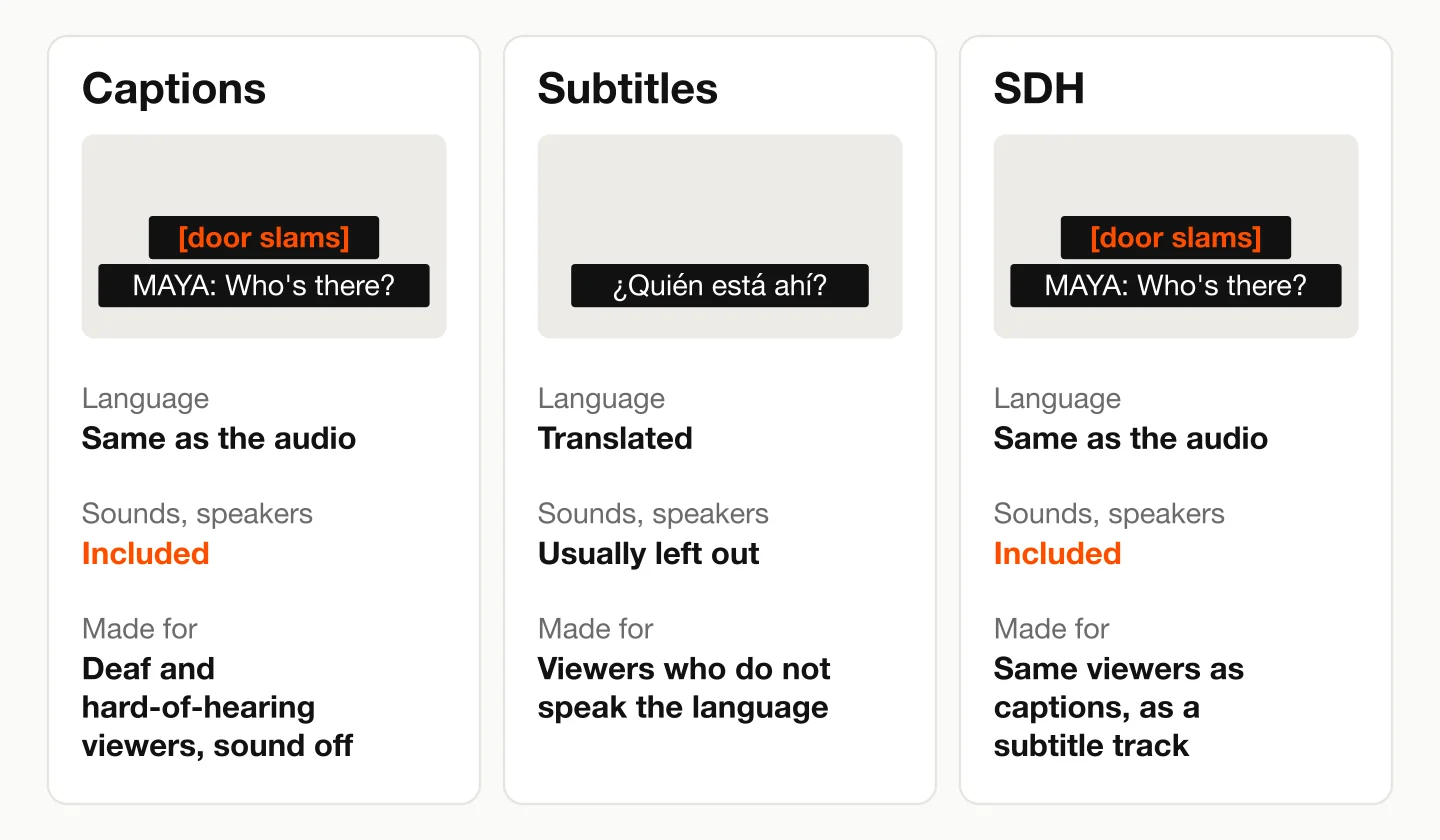
- Captions are in the same language as the audio and include the sounds and speaker names needed to follow it, such as [door slams] or [laughs]. WCAG's glossary lists "sound effects, music, laughter, speaker identification and location" as part of captions.
- Subtitles translate the dialogue for viewers who can hear it but do not speak the language. The W3C's caption techniques put it plainly: subtitles "provide text of only the dialogue, in a different human language, and do not include important sounds". In the UK and some other countries, "subtitles" is also the everyday word for captions.
- SDH means subtitles for the deaf and hard of hearing: same-language subtitles that also carry sounds and speaker names. Netflix's English (USA) Timed Text Style Guide has a separate SDH section that uses brackets for sound effects and speaker IDs, and treats SDH as same-language subtitles.
For social video, most "captions" are really dialogue-only: the spoken words, no sound cues. That is fine for muted viewing. If accessibility is the goal, add the sounds that matter to the story, such as [music stops] or [crowd cheers], whichever way you deliver the captions.
Do open captions meet accessibility guidelines?
Yes, if they are complete. WCAG success criterion 1.2.2, Captions (Prerecorded), is a Level A requirement: captions must be provided for all prerecorded audio in synchronized media, unless the media is itself a labelled alternative to text. The W3C lists open captions (technique G93) and closed captions (technique G87) as sufficient techniques, and notes that open captions work in any player because they need no caption support at all.
Two conditions apply to both kinds. The captions must include the sounds needed to understand the content, not only the dialogue. And, in the W3C's words, captions "should not obscure or obstruct relevant information in the video", which is a good reason to keep burned-in captions away from on-screen text and faces.
Legal requirements depend on who you are and where you publish, and this is not legal advice. One example: in the US, the FCC's rule for online video, 47 CFR 79.4, applies to programming that was shown on US television with captions, and its definition of video programming excludes consumer-generated media. Businesses, schools and public bodies may be covered by other accessibility laws, so check what applies to you.
How to make open or closed captions
Both start from the same thing: an accurate, timed transcript. Here are free ways to get each output, including tools we make.
| You want | Free option | Output |
|---|---|---|
| A caption file from audio | Audio to SRT converter | SRT, VTT or TXT |
| A caption file or transcript from video | Video to text converter | TXT, SRT or VTT |
| Open captions from a video, plus a file | Free caption generator | Captioned MP4, SRT, VTT |
| Open captions from a file you already have | Subtitle burner | MP4 with the SRT or VTT burned in |
| Closed captions on YouTube | YouTube's automatic captions, corrected in Studio | Caption track |
All four captionrich tools run in the browser with no sign-up and no watermark. The speech model in the first three runs on your device, which keeps your file private but makes long videos slower on older laptops and phones.
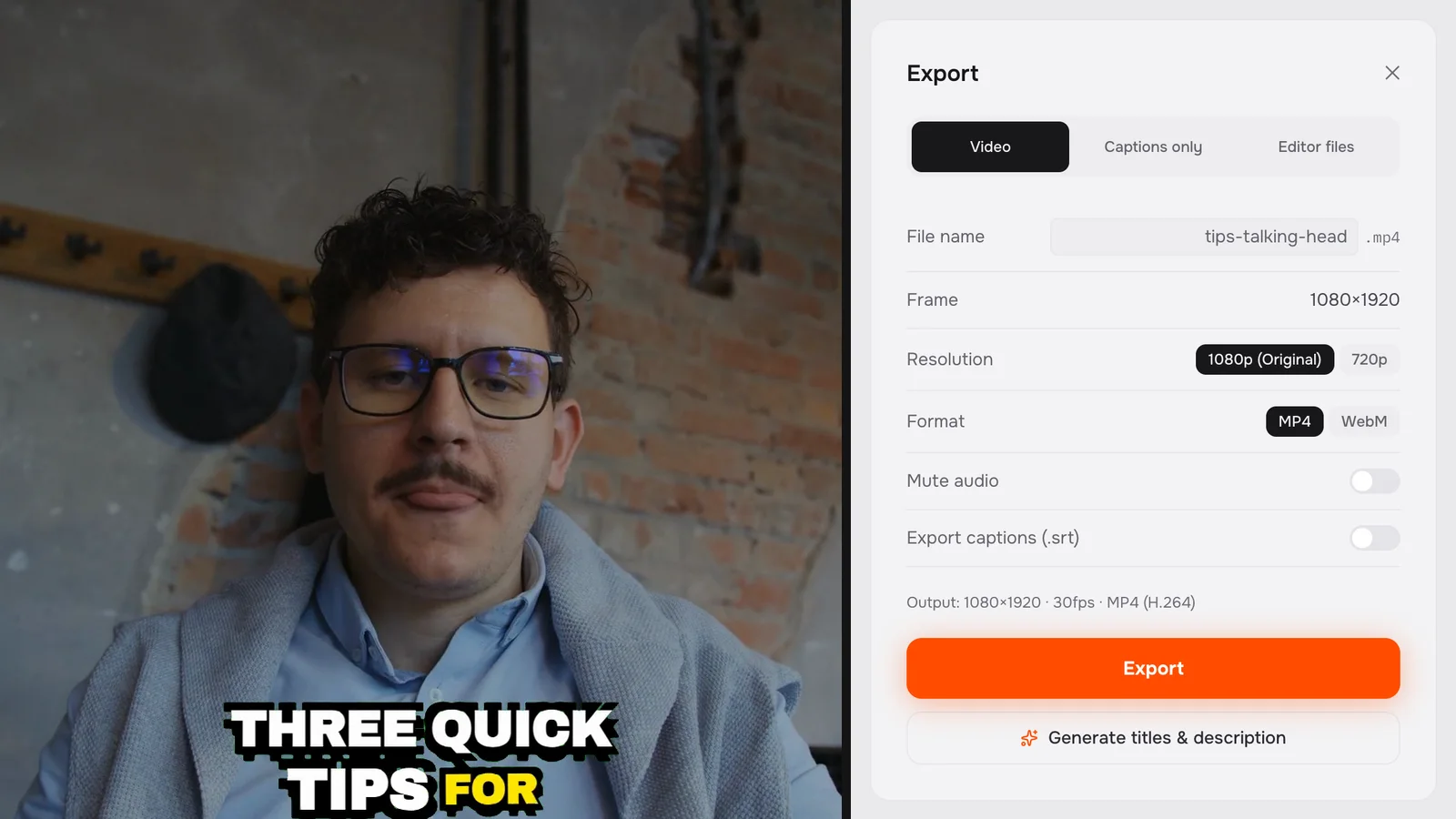
If you want both outputs from one edit, the captionrich editor does it in one pass: it transcribes the video, lets you fix any word and pick from 40+ animated caption styles, then exports the MP4 with open captions and, with Export captions (.srt) switched on, the matching SRT file for platforms that accept closed captions. Your edits to the words appear in both. Professional editors such as Premiere Pro and DaVinci Resolve can export captions either burned in or as a separate file, which is the better route if you already finish your videos there.
Frequently asked questions
- What is the difference between open and closed captions?
- Open captions are burned into the video and cannot be turned off. Closed captions are a separate track that the player draws and the viewer can turn on or off.
- Are burned-in captions the same as open captions?
- Yes. Burned-in, hardcoded and open captions all mean captions rendered into the video frames.
- What does CC mean on a video?
- CC stands for closed captions. The CC button turns a caption track on or off; it has no effect on open captions, which are part of the picture.
- Is SDH the same as closed captions?
- They carry the same kind of information: the dialogue plus sounds and speaker names, in the same language. The difference is mostly format and name. SDH is a subtitle track, while "closed captions" traditionally refers to TV caption formats such as CEA-608.
- Can I upload an SRT file to Instagram or TikTok?
- Neither documents a way to do it for regular posts as of November 2026. Both offer automatic captions; for captions you write and style yourself, burn them into the video before uploading.
- Are open captions accessible?
- They can meet WCAG 1.2.2 if they include the speech and the sounds needed to follow the video. Viewers cannot resize them, so make them large and high-contrast to begin with.
- Should I use open and closed captions together?
- On platforms that accept caption files, yes. Open captions serve the muted feed, and the caption track serves viewers who keep captions on and want their own size and colour settings. Some viewers will then see both, which is a reasonable trade.