How to add Arabic, Urdu and Hindi captions to a video
By captionrich team · Published November 26, 2026 · 11 min read
To add Arabic, Urdu or Hindi captions to a video, use one of three routes: the platform's automatic captions (YouTube covers Arabic and Hindi but not Urdu), an SRT subtitle file uploaded next to the video, or captions burned into the picture. Whichever you choose, set the text direction (right to left for Arabic and Urdu), use a font that has the script's letters (a Nastaliq face for Urdu), give the lines extra height, and proofread, because speech-to-text makes more mistakes in these languages than in English.
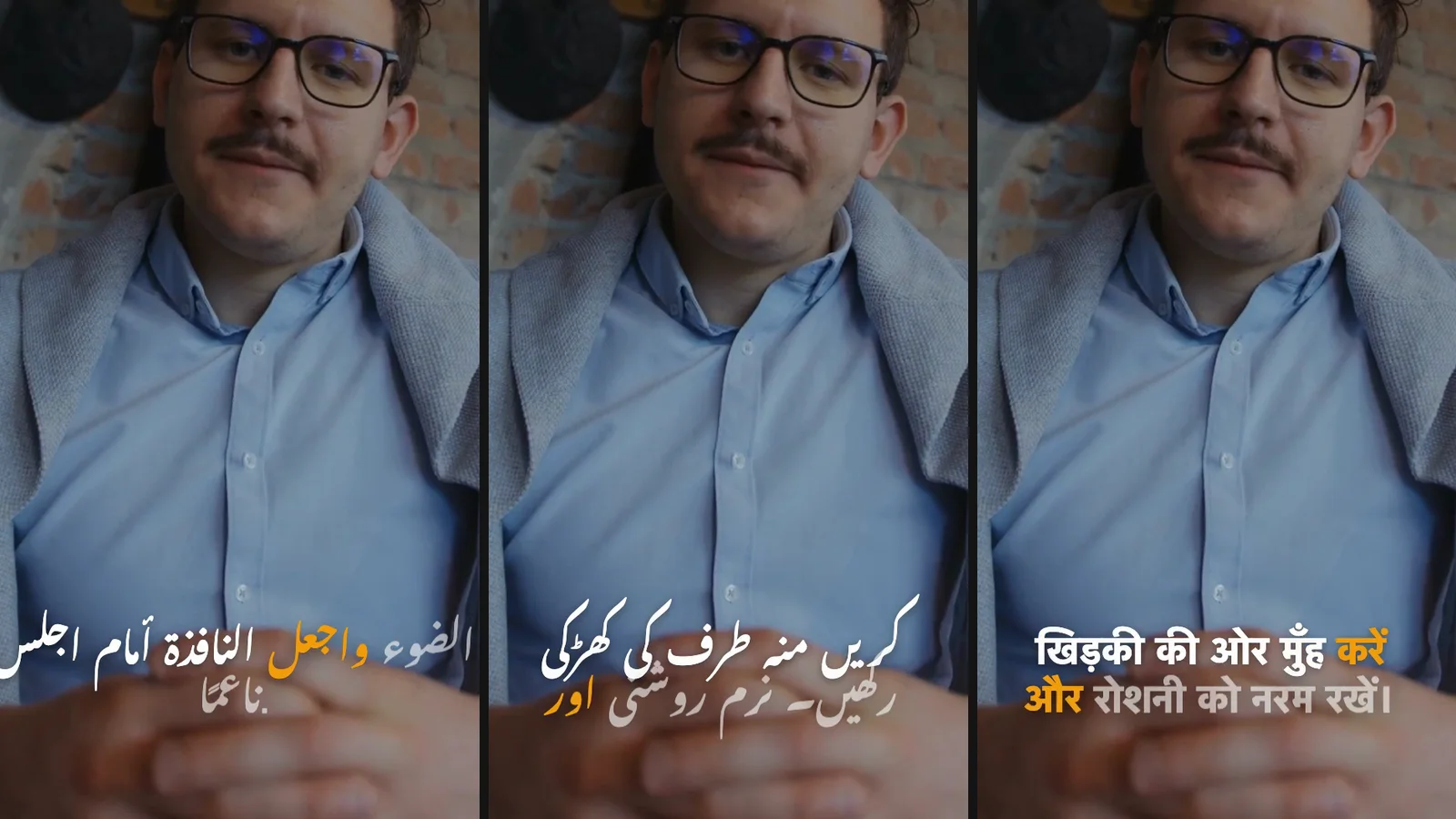
Arabic, Urdu and Hindi captions break in ways English captions never do. Two of the three languages run right to left, one is usually written in a calligraphic style that most caption fonts do not have, and Urdu and Hindi are close to the same spoken language written in two different scripts. This guide covers the ways to get captions onto a video, then the script rules that decide whether they read correctly.
Three ways to add Arabic, Urdu or Hindi captions
| Method | Arabic | Urdu | Hindi | Viewers can turn it off | You control the look |
|---|---|---|---|---|---|
| YouTube automatic captions | Yes | Not in YouTube's list | Yes | Yes | No |
| Your own SRT file on YouTube | Yes | Yes | Yes | Yes | No |
| Captions burned into the video | Yes | Yes | Yes | No | Yes |
1. The platform's automatic captions
YouTube's automatic captions include Arabic and Hindi. Urdu was not in its language list when we checked, so Urdu videos need one of the other two routes. YouTube's help also says automatic captions may not generate when several languages are spoken at once. TikTok and Instagram have built-in captions too; open the captions option in the app and check that your language is listed before you rely on it.
Platform captions are free and viewers can switch them off, but the platform picks the font and position. Always read them through before you publish.
2. Upload an SRT subtitle file
An SRT file is plain text: a number, a start and end time, and the caption line, repeated for each caption. YouTube accepts it in any language, Urdu included. You need the file first, either typed by hand or exported from a caption editor.
- Save the file as UTF-8. UTF-8 is the text encoding that keeps Arabic and Devanagari letters intact. A file saved in an older encoding shows question marks or broken characters.
- Open YouTube Studio. Go to Subtitles in the left menu and pick the video.
- Add the language. Click Add language, choose Arabic, Urdu or Hindi, then click Add under Subtitles.
- Upload with timing. Choose Upload file, then With timing, select the SRT and save. These steps follow YouTube's add subtitles help page.
- Play it back. Watch a minute with the subtitles on and check that punctuation and numbers sit at the correct end of each line.
3. Burn the captions into the video
Burned-in captions are drawn into the picture, so they look the same on TikTok, Reels, Shorts and WhatsApp, in any language, and viewers cannot turn them off. This is the only route that works on platforms with no captions for your language. The steps below use captionrich, a browser editor (we make it); any caption editor that handles these scripts follows the same shape.
- Upload and set the spoken language. On the upload step, pick Arabic, Urdu or Hindi under Spoken language, or leave it on Auto-detect. If auto-detect hears Hindi, captionrich asks whether the video is Urdu or Hindi, because the two sound the same when spoken. Your answer decides the script of the transcript.
- Read the transcript and fix words. Click any word to correct it. Listen to the stretches where the speaker switches into English.
- Pick a caption style. Arabic and Urdu captions switch to right to left on their own, set in Noto Sans Arabic for Arabic and Noto Nastaliq Urdu for Urdu. Hindi captions keep the style's font, so open Customize and choose Mukta or Poppins, which have Devanagari letters.
- Check line breaks and position. Keep lines short, check that the tall marks are not cut off, and keep the captions clear of the app's buttons.
- Export. Export an MP4 with the captions burned in. If you also want a subtitle file for YouTube, download the SRT, which is saved as UTF-8.
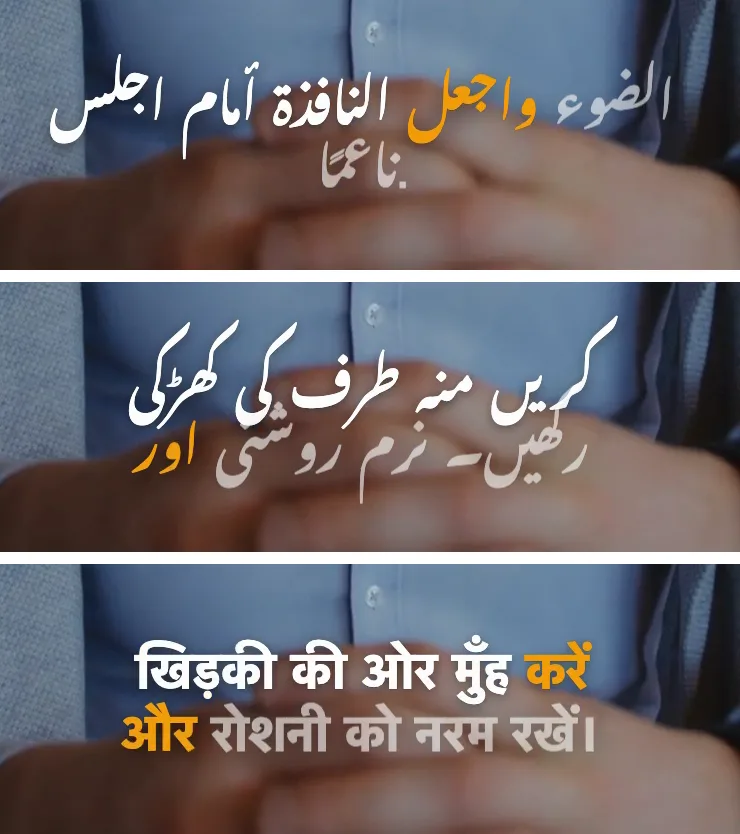
Transcription and auto captions work in these languages on the Free plan (3 videos a month, up to 3 minutes each, no watermark). For the difference between a file and burned-in text, see open captions vs closed captions.
What makes these scripts different from English captions
Right to left (Arabic and Urdu)
Arabic and Urdu are read from right to left, but numbers and any English words inside them still read left to right. The software works this out from a base direction set for the whole line. Set that base wrong and the letters still display, but the punctuation and numbers move to the wrong end.
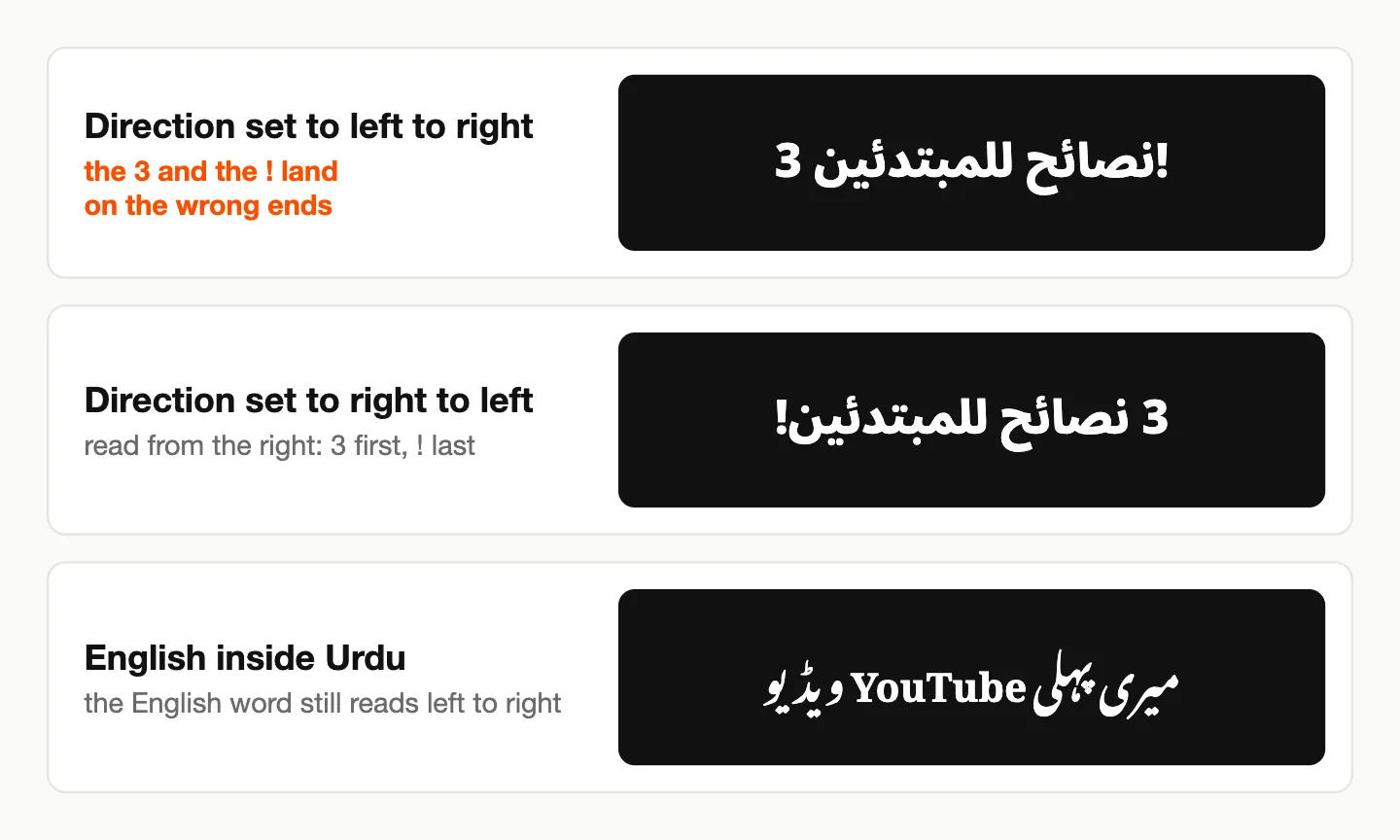
Caption layouts should mirror too: text aligned to the right, highlights sweeping from right to left. In captionrich, text layers and hook titles take their direction from the text itself, and their layouts mirror for right-to-left. When a project mixes languages, for example an Urdu video with an English clip inserted, each caption takes the direction and font of its own language.
Urdu: Nastaliq or Naskh
Urdu uses the Arabic alphabet plus extra letters, and it is usually written in Nastaliq, a sloping style where each word steps down toward the baseline. The W3C's Arabic and Persian layout requirements note that Naskh is the default style for Arabic in most contexts, while Nastaliq remains the preferred style for Urdu in Pakistan. A Naskh font has all the letters, so an Urdu caption in it is readable, but it is not the style Urdu readers are used to.
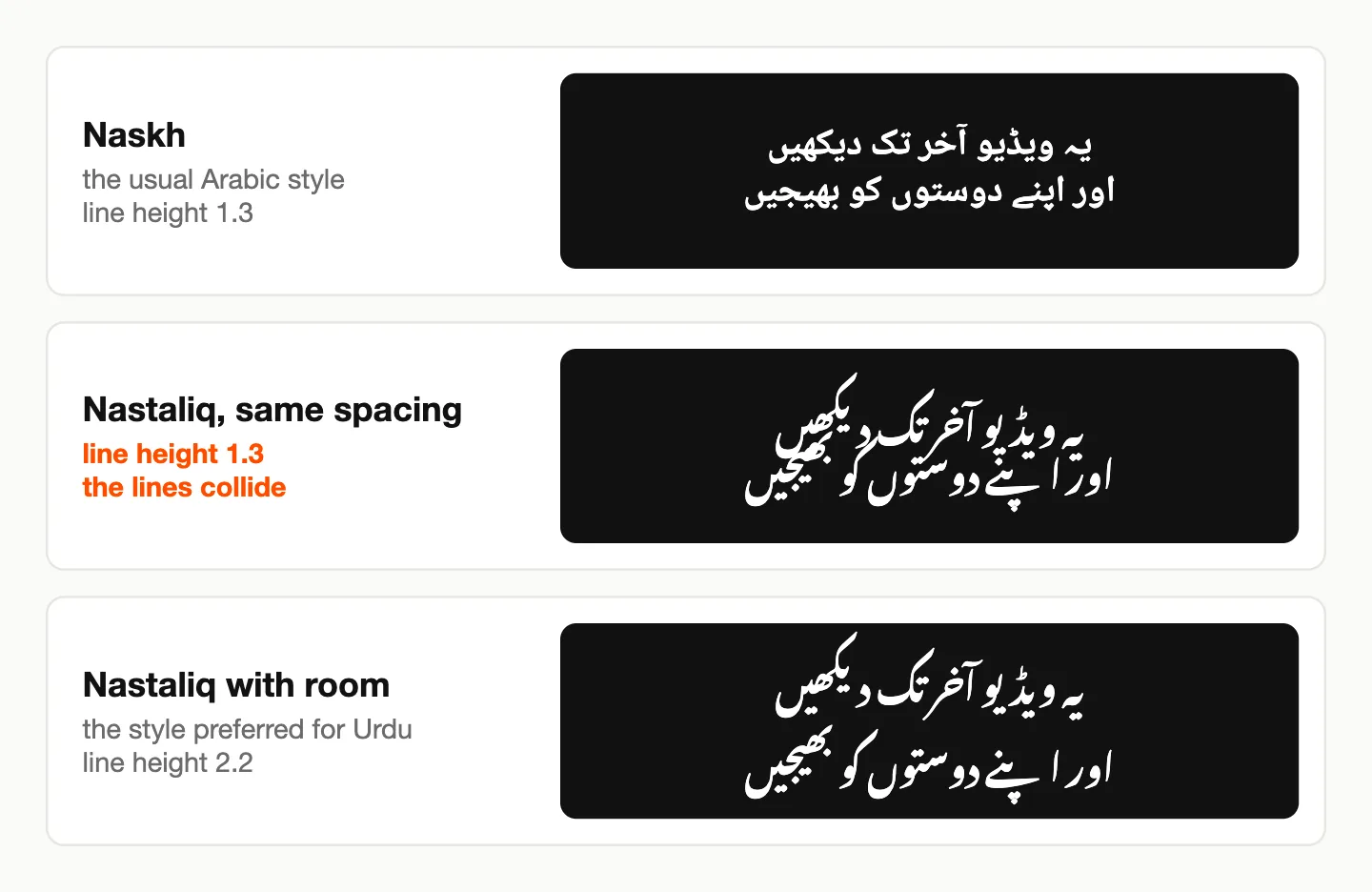
The cost of Nastaliq is height. Its letters stack and slope, so a caption needs roughly twice the line spacing of an English one. Plan for one line where you can, and make sure a caption background box is tall enough not to cut off the dots and tails.
Hindi: Devanagari shaping and line height
Hindi is written in Devanagari, left to right. Letters hang from a horizontal headline, consonants combine into conjunct forms, and vowel marks sit above and below the letters. The W3C's text size in translation article lists Devanagari, along with Arabic in Nastaliq fonts, among the scripts that need more vertical space between lines than Latin text.
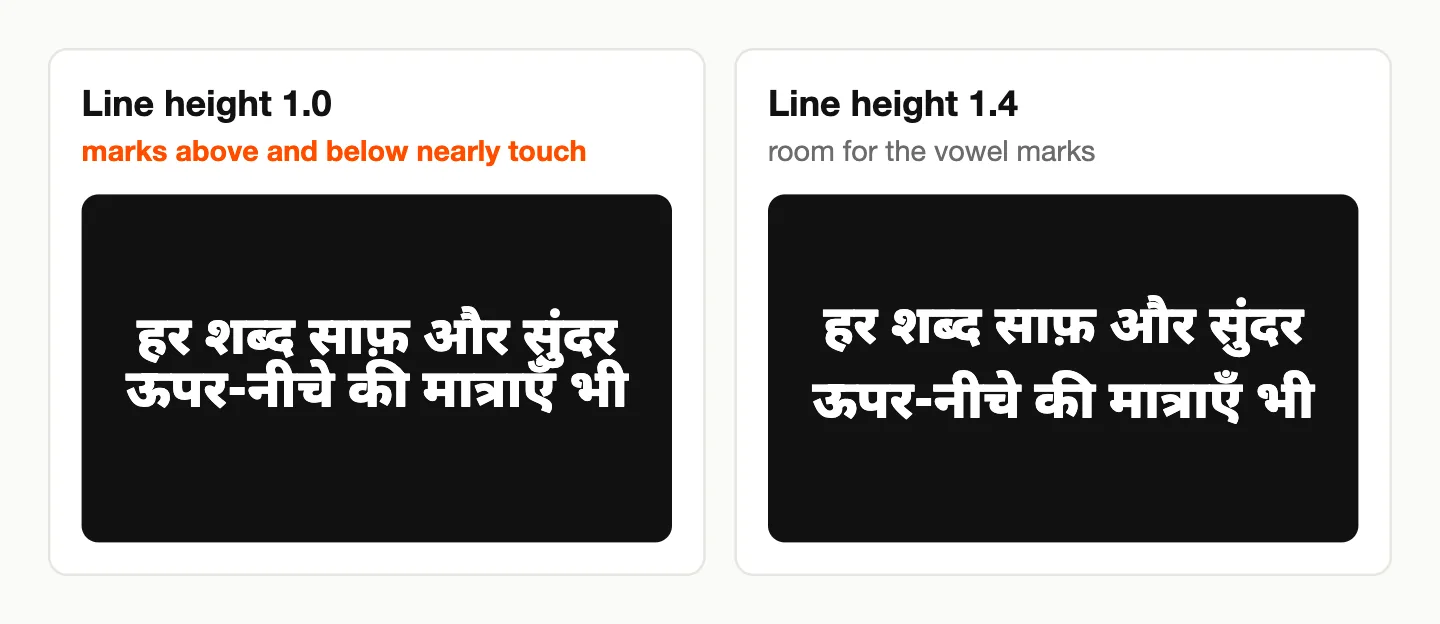
Avoid letter spacing on Hindi captions. Spacing the letters apart breaks the headline into pieces. The same applies to Arabic and Urdu, where letters join: the W3C notes that moving joined letters apart gives undesirable results.
Fonts that do not have the letters
Most bold caption fonts only cover Latin letters. When a font lacks a character, the device swaps in whatever font it has, so the caption ends up in a mix of faces or, in the worst case, shows empty boxes. Pick a font made for the script, such as one of the families in the table below, and check the export, not just the preview.
In captionrich, the font picker for text layers and hook titles can filter by script. When the chosen font has no letters for the text, a face for that script in the same voice takes over (Noto Nastaliq Urdu for Urdu, Cairo for Arabic, Mukta for Hindi in the plain sans voice), letter spacing switches off for joined scripts, and line spacing grows for tall ones.
Mixed-language speech
Few people speak only Urdu or only Hindi on camera. Hinglish and Urdu sentences full of English terms are normal, and Arabic speakers drop in English product names. A transcript is written in one script, so English words inside Hindi or Urdu speech may come back in the main script, in Latin letters, or not at all. Decide which form your viewers should read and fix the transcript to match. If your audience reads Roman Urdu (Urdu in Latin letters), note that captionrich does not convert between scripts, so those captions would have to be typed.
Punctuation and numerals
- Arabic uses its own comma (،) and question mark (؟). The W3C notes that three families of digits are used with the Arabic script, Western 0 to 9 among them, so pick the one your audience reads and keep it.
- Urdu ends a sentence with its own full stop (۔) and uses the Arabic comma and question mark.
- Hindi ends a sentence with the danda (।) and uses the same question and exclamation marks as English. Devanagari has its own digits (०१२३), and 0 to 9 are common too. Choose one style for the whole video.
Script rules at a glance
A reference for setting captions in each script. The font families are all on Google Fonts. The last column says what captionrich does with captions in that language today.
| Script and language | Direction | Letters | Line spacing | Punctuation and digits | Google Fonts families | captionrich captions |
|---|---|---|---|---|---|---|
| Arabic, Naskh style (Arabic) | Right to left | Join; never letter-space | Taller than English (captionrich text layers: at least 1.35) | ، ؟ and Arabic-Indic or Western digits | Noto Naskh Arabic, Noto Sans Arabic, Cairo, Amiri | Right to left, Noto Sans Arabic, automatically |
| Arabic script, Nastaliq style (Urdu) | Right to left | Join on a sloping line | About twice English (captionrich: 2) | ۔ ، ؟ | Noto Nastaliq Urdu, Gulzar | Right to left, Noto Nastaliq Urdu, automatically |
| Devanagari (Hindi, also Marathi and Nepali) | Left to right | Hang from a headline; conjuncts; marks above and below | Taller than English (captionrich text layers: at least 1.4) | । and ०१२३ or 0 to 9 | Noto Sans Devanagari, Mukta, Hind, Poppins | Template font kept; choose Mukta or Poppins in Customize |
How accurate is speech-to-text in Arabic, Urdu and Hindi?
Less accurate than in English, and Urdu especially so. We do not have a measured error rate to quote, but expect more missed words, more trouble with names, and errors where the speaker switches between languages. captionrich transcribes editor uploads with Deepgram's Nova-3 model, which lists Arabic, Urdu and Hindi. In Urdu videos we have checked, the transcript sometimes skipped English phrases dropped into Urdu sentences.
Two other limits to know. Spoken Urdu and Hindi are close to the same language, so no detector can reliably tell which script you want; that is why captionrich asks instead of guessing. And Arabic spans many regional dialects, so results can vary from one speaker to the next. None of this means you should skip automatic transcription. It means you should budget time to proofread.
Proofreading checklist for Arabic, Urdu and Hindi captions
- Right script. Urdu in Urdu letters, Hindi in Devanagari. If the transcript came back in the wrong one, transcribe again with the language set.
- Nothing missing. Play the video while reading along. Look hardest at English phrases inside Urdu or Hindi speech and at fast passages.
- Names, brands, numbers. Check every one against what was said.
- Direction. In Arabic and Urdu, the first word sits on the right, and the full stop or question mark on the left.
- One digit style. Western or native digits, the same in every caption.
- Line breaks. No word split across lines, short lines, one idea per caption where possible.
- Font. No empty boxes or mixed faces. Urdu in a Nastaliq font if your viewers expect it.
- Height. Nothing clipped at the top or bottom: Nastaliq dots and tails, Devanagari vowel marks, and the caption background box.
- On a phone. Watch the export on a phone, where most viewers will see it, with the app's buttons in view.
Translating captions into Arabic, Urdu or Hindi
If you speak English on camera and want Arabic, Urdu or Hindi captions, you translate the caption text and keep the timing. captionrich's AI Translate does this on the Pro and Max Pro plans: each caption keeps its start and end time, the direction and font switch for Arabic and Urdu, and the Simple and Simplest styles can show the original and the translation together, each line in its own direction. Machine translation still needs a fluent reader before you publish. The full workflow, including what breaks when lines get longer, is in how to translate video subtitles.
Frequently asked questions
- Does YouTube auto-caption Urdu videos?
- Urdu was not in YouTube's list of automatic caption languages when we checked. Upload your own Urdu SRT file in YouTube Studio, or burn the captions into the video.
- Which font is best for Urdu captions?
- A Nastaliq font such as Noto Nastaliq Urdu or Gulzar, both free on Google Fonts. Give it about twice the line spacing of English, and keep captions to one line where you can.
- Why does the punctuation in my Arabic captions appear on the wrong side?
- The caption is set left to right. Set the direction to right to left in your editor, or in a subtitle file add a RIGHT-TO-LEFT MARK (U+200F) after the punctuation.
- Why does my Arabic or Hindi SRT show question marks or strange characters?
- The file was saved in the wrong text encoding. Open it in a text editor, save it as UTF-8 and upload it again.
- Can one caption mix Hindi and English?
- Yes. Decide whether the English words appear in Latin letters or in Devanagari, keep that choice through the video, and use a font that has both scripts, such as Mukta or Poppins.
- Can captionrich translate English captions into Arabic, Urdu or Hindi?
- Yes, with AI Translate on the Pro and Max Pro plans. Each caption keeps its timing, and Arabic and Urdu switch to right to left with a matching font. Have a fluent speaker read the result before you publish.